[Help] Lost IP address, cannot access

IPv4/6, Port, VPN, proxy, SSH, remote access and more.
Post Reply
User avatar
8Dx4iZFF
Posts: 2
Joined: 05 Feb 2026, 21:17
United States of America

[Help] Lost IP address, cannot access

Post by 8Dx4iZFF »

I cannot access my F4-424 Pro after rebooting. This is a recurring problem. I want to avoid a system re-install this time.

PROBLEM:
My F4-424 Pro always loses its IP address allocation:
(1) when the F4-424 reboots (running TOS 5.X and TOS 6.X);
(2) and/or when my old router would reboot (Arris BGW210-700);
(3) and/or when my new router reboots (Arris BGW320-500);

For both the old router and the new router, I was/am connected directly to the router using two (2) LAN connections on a link aggregation. I was connected using one of the bond methods, likely "Self-adapting Load Balance" or "IEEE 802.3as Dynamic Link Aggregation" though I cannot remember for sure. Likely whichever was default?

On the new router, one of the connections is 2.5Gbs and one is 1Gbs (on the old router, both were 1Gbps). With both routers on multiple TOS versions, I could be connected successfully for months at a time before a reboot would cause this problem.

ATTEMPTS:
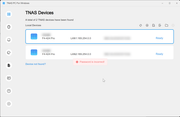
Regardless of TOS 5.X or 6.X, and regardless of "2 x 1Gbps" LAN or "1 x 2.5Gbps + 1 x 1Gbs" LAN configuration, the two LAN links to the F4-424 are visible as "169.254.0.0" in the TNAS PC application (5.2.506 and 5.2.510).
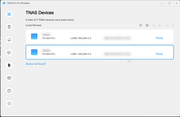
Image.

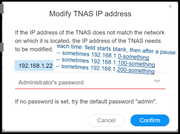
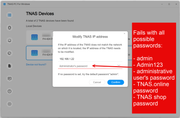
After clicking on either link, the TNAS PC application prompts me to "Modify TNAS IP address" by seemingly requesting a DHCP allocation from the router and then prompting for a password.
Image

But I have tried every known possible password that is connected to this TNAS device: "admin", "Admin123", the administrative (and sole) user's password, the TerraMaster account that allows for TNAS.online remote access, even the password I used to purchase the device from the shop.terra-master.com site. None work; they all return "Password is incorrect!" in a red box.
Image

I have tried every permutation of rebooting the TNAS device, rebooting the router, rebooting both in different sequences, disconnecting one of the LAN cables before rebooting, disconnecting both LAN cables before rebooting. I have tried different cables (but to reiterate, this link has been stable for months).

HELP:
(1) Is there another password to try modifying the IP address in the TNAS PC application?
(2) Why do my known passwords and the default password(s) fail when modifying IP address using the TNAS PC application?
(3) How can I access my TNAS directly — without networking — when this frustratingly frequent TNAS problem happens?
(4) How can I access my TNAS without doing a system re-install?

INFO:
(1) TNAS model = F4-424 Pro
(2)(a) TNAS OS = 5.X (can't remember exactly)
(2)(b) TNAS OS = 6.X (can't access; can't remember exactly)
(3)(a) Router model = Arris BGW210-700
(3)(b) Router model = Arris BGW320-500
(4)(a) Connection = "2 x 1Gbps" LAN
(4)(b) Connection = "1 x 2.5Gbps + 1 x 1Gbs" LAN
(5) Link aggregation = Likely either "Self-adapting Load Balance" or "IEEE 802.3as Dynamic Link Aggregation" (can't remember exactly; likely whichever was default)
(6)(a) TNAS PC version = 5.2.506
(6)(b) TNAS PC version = 5.2.510
(7) Yes, I've tried rebooting.
(8) Blood type = O-positive

Last time this happened, I ended up doing a system re-install. I really hope to avoid a system re-install again. Such an outcome would really sour my private and public opinion of Terra-Master.
User avatar
Gremlin
Gold Member
Posts: 1625
Joined: 02 Dec 2022, 22:31
Great Britain

Re: [Help] Lost IP address, cannot access

Post by Gremlin »

The Link Aggregation is a "red herring" for now. Stick with a single lan connection for diagnosing the problem. Sounds like the nas is not getting an IP address from DHCP (are the routers dhcp capable locally?). And/or the the LAN ip on the nas is incorrectly set? Do you have any other devices on the network that may be interfereing with DHCP? {Was a problem with some TP-Link powerline devices that had a hidden dhcp server.}

The 'password' required would be the one used on installing the TOS os - ie the administrative user password.
F5-221 TOS7.0.0777 - 4x4TB (Ironwolf) Traid
F2-424 TOS7.0.0777 - 2x500GB nvme (P3) Traid, 2x6TB HDD (HGST) Traid
F2-221 TOS7.0.0777 - 1x3TB Ext4, 1x4TB Btrfs
F2-425+ TOS7.0.0777 - 2x500GB nvme (P3) Traid, 2x6TB HDD (EXOS) Traid
User avatar
8Dx4iZFF
Posts: 2
Joined: 05 Feb 2026, 21:17
United States of America

Re: [Help] Lost IP address, cannot access

Post by 8Dx4iZFF »

Gremlin wrote: 06 Feb 2026, 01:14

DHCP:
Each time I click on a 169.254.0.0 device in the TNAS PC application, the field is blank for a moment and then populates a moment later, each time with a different IP address. This IP address is populated seemingly on the fly, and it falls into what I believe to be the DHCP allocation block of the router: "192.168.1.x". (I can verify the exact settings in a few hours.) In the case of the following screenshot, I believe 192.168.1.22 was a valid address that no other devices on my LAN share, but I also remember seeing this morning seemingly valid variations of 192.168.1.1XX (100-something) and 192.168.1.2XX (200-something):
Image

I've never noticed an IP address in that "Modify IP address" window to be the same as one of the 17-ish devices in my little home network. And each time it seems to populate with a different yet valid & unused address from the DHCP allocation pool. To me, none of the other devices on my home network seem to be likely culprits of hidden DHCP tomfoolery (a Philips Hue bridge, an HDHomeRun tuner box, a few smart plugs, a couple of phones, a couple of laptops, game systems, media players, a few TVs, a smart speaker, et al). I do remember that the last time this happened, when I eventually and begrudgingly did a system re-install, I physically disconnected the other LAN devices and tried shutting off or disconnecting most of my Wi-Fi devices. That had no effect. I haven't gotten that desperate this time, but I don't want to!

MAC ADDRESSES:
Something I failed to mention in the first post was that I had successfully set up port forwarding using static IP allocation for my F4-424 Pro on both routers — based I believe on a virtual MAC that points to the aggregated link? (I had set up SSH and SFTP for WAN usage, and it had been working fine for months.) I believe both routers always list three (3) MAC addresses for my F4-424 Pro in the network device list:
  • LAN-1: 00:00:00:00:00:0d (same as LAN-2 except for final character d)
  • LAN-2: 00:00:00:00:00:0e (same as LAN-1 except for final character e)
  • Both: xx:xx:xx:xx:xx:xx (no shared pattern with LAN-1 or LAN-2; virtual MAC?)
Again, I will have to wait a few hours to verify the router settings, but I believe I had set the port forwarding and static IP allocation in both routers by telling the router to look for the virtual MAC(?) address. (I did not set up static IPs for the individual LAN-1 or LAN-2 MAC addresses.)
  • When LAN-1 is connected, the routers say 00:00:00:00:00:0d is connected and the other two MACs aren't connected.
  • When LAN-2 is connected, the routers say 00:00:00:00:00:0e is connected and the other two MACs aren't connected.
  • When both LAN-1 and LAN-2 are connected, the routers say xx:xx:xx:xx:xx:xx is connected. (I don't remember if the router says the other two MACs are connected or not.)
  • When no LANs are connected to the F4-424 Pro, the routers say none of the three MACs are connected.
In each of those cases, the router still says DHCP for the device is "pending" and gives no IP address unlike the other devices in the network — even though the router says the link is connected. The previous time this happened, I tried rebooting both the F4-424 Pro and the router (the NAS, the router, or both simultaneously) in one of these four (4) LAN configurations: LAN-1 connected, LAN-2 connected, both LAN-1+LAN-2 connected, or no LAN connected. None of those 4 LAN configurations — including after changing the physical cables last time — across the 3 different types of reboot scenarios ever worked, which is why I eventually chose to do a system re-install last time. I want to avoid trying all these different permutations this time!

PASSWORD:
Here I am certain that I have tried every possible password that has any connection with my F4-424 Pro. Also, this same inexplicable "Invalid password" error both occurred on my previous install and is occurring on this current installation. (Yes, I also tried the password from the last installation during this morning's frustration.)
Image

In addition to trying both of my administrator passwords (first installation and current installation) — which TOS had previously accepted as the administrator password when I migrated volumes and deleted storage pools and SSH'd into the F4-424 Pro from both the LAN and WAN — I also have tried several possible defaults: The pop-up window says "admin" is the default, which of course I've tried in lowercase and in all caps ("ADMIN"). I saw some scattered references to "Admin123" in my searches, so I've tried that as "Admin123" and "ADMIN123" and "admin123".
Image

It does not make sense to me that the same password error would occur on two separate installations, especially since I have records in my password manager of every password I've generated for this device. (Again, I even tried the password I generated in order to buy this device, the password I generated to set up TNAS.online, and even the password I generated to sign up for this forum!) I'll say that I am confident in my habitual usage of my password manager.

I am the administrator and only user of this F4-424 Pro; I am the administrator and usually the sole user on my home network. I have no other possible password to try.
Post Reply

Return to “Network”