[Help] Emby app was installed in wrong volume
Posted: 04 Feb 2026, 00:16
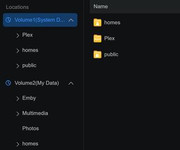
I have a F4-424 Max that is running TOS 7.0.0398. I have tried to install the Emby app in volume 1 on several occasions and it always installs it on volume 2.
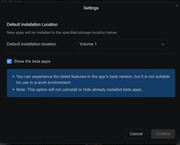
I have App-Center setting to install new apps on Volume 1 and I have tried it set to "ask me every time" and every time it installs it on Volume 2
App-Center settings
Emby App location
Any help resolving this issue would be appreciated.
I have App-Center setting to install new apps on Volume 1 and I have tried it set to "ask me every time" and every time it installs it on Volume 2
App-Center settings
Emby App location
Any help resolving this issue would be appreciated.