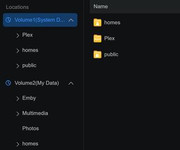
I have a F4-424 Max that is running TOS 7.0.0398. I have tried to install the Emby app in volume 1 on several occasions and it always installs it on volume 2.
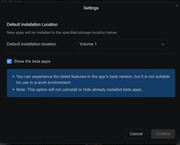
I have App-Center setting to install new apps on Volume 1 and I have tried it set to "ask me every time" and every time it installs it on Volume 2
App-Center settings
Emby App location
Any help resolving this issue would be appreciated.
Shared folders created by applications are located on the same storage volume as their installation location by default. If the shared folder already existed before the application was installed (e.g., it was installed and uninstalled), it will continue to use its original location upon reinstallation. To move it to a different volume, please go to Control Panel > Shared Folders > Edit > Location, and select the target volume.
To contact our team, please send email to following addresses, remember to replace (at) with @:
Support team: support(at)terra-master.com (for technical support only)