Page 1 of 1
[Help] Can't create a Shared folder beside the "public" default one
Posted: 23 Jan 2026, 20:15
by Dems
Hi team !
When I try to create a folder, it create it under the public default one.
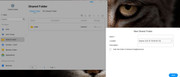
How to create a folder beside the public one ?
The tutorial that I found doesn't seems to encounter that trouble;
https://www.youtube.com/watch?v=Nj_hU9oJw98
Thanks.
Re: [Help] Can't create a Shared folder beside the "public" default one
Posted: 24 Jan 2026, 11:40
by ColaChen
Dems wrote: ↑23 Jan 2026, 20:15
Hello! Would you like to create a subfolder under the Public folder? To do so, please go to the desktop and create it via the File Manager.
Re: [Help] Can't create a Shared folder beside the "public" default one
Posted: 24 Jan 2026, 16:52
by Dems
No.
When I use the create button on the screenshot, it creates by default a folder under public.
It works well.
But I would like to create a folder beside the public (at the same hierarchy level) and I don't find any option for that.
Re: [Help] Can't create a Shared folder beside the "public" default one
Posted: 24 Jan 2026, 18:34
by Gremlin
All shared folders should be at the same hierarchical level. What version of TOS are you using (and machine)?
Re: [Help] Can't create a Shared folder beside the "public" default one
Posted: 24 Jan 2026, 19:50
by ColaChen
The location shown in your screenshot is indeed where new shared folders are created. Once created successfully, the folder should be at the same level as the public folder, and you can view its full path in File Manager.
However, based on your description, the actual result does not match this expected behavior. To help us accurately reproduce and identify the issue, could you please provide the following additional information:
- More screenshots of the related interfaces (for example, the folder list after creation, or the path display in File Manager), or
- A short video showing the complete process from folder creation to viewing it.
This will greatly help us determine whether the issue is related to the user interface, permission settings, or underlying system logic. Thank you for your cooperation!
Re: [Help] Can't create a Shared folder beside the "public" default one
Posted: 27 Jan 2026, 19:09
by Dems
Thanks for your answer.
I agree that all shared folder should be at the same hierarchical level.
My model is the F6-424 Max and the TOS version is 6.0.794-01324
After my first screenshot in my first post, I type in the name of new folder I want to create "Julien". Then, I clic on "Next" blue button and it gives me error message in red that you can see on top of the screenshot.
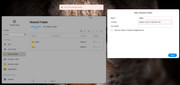
The very first time, it creates me that Folder under public, not at the same level.
My understanding is (not sure, though): it try to create it again under public, and as it exist, I have that red error message.
But as we agree, that should not be the behaviour. It should create the folder on the same hierarchical level than public, not below.
As requested, please find the file manager screenshot.
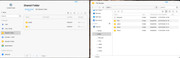
Another interesting point as I took time to play and understand the interface as I'm coming from Synology. So, I try to create a folder name x and when creating, I clic on the box "Hide this folder in Network Neighborhood", and then it went through and create it properly on the same hierarchical level than public. I was able to reproduce it with other new folder with that box ticked.
Re: [Help] Can't create a Shared folder beside the "public" default one [SOLVED]
Posted: 27 Jan 2026, 19:22
by CursaYang
The shared folder you created is at the same level as the public folder, not inside the public folder. Do you have a user named Julien? When creating this user, a homonymous user directory is generated under the homes folder by default. The name of the shared folder cannot conflict with the name of the user directory.
Re: [Help] Can't create a Shared folder beside the "public" default one
Posted: 28 Jan 2026, 21:21
by Dems
Yes, I have an user named Julien !
Thanks for that !