

First of all will say not sure if this the right place to post this. If not would be appreciated to point me to the right place.
I was having issues trying to access from the File Explorer window. Can login via the web portal.
I keep getting blocked by windows security even when I login with correct info can't get in.
I spent hours browsing and trying to figure it out. I finally reset all my settings and still being blocked.
I can access the main parent folder which shows all the sub folders but as soon as I try to enter one the windows security window pops up asking for login info. I enter my username and password and it gives me the access denied error.
Also just noticed I was able to access via VLC on my FIrecube but now it giving me login error there too.
Could it be a problem with my password? I used letters numbers and symbols combined to make it.
Any help would be appreciated.
[Help] can't access through windows file explorer [SOLVED]
-
AlAleksiev

- Posts: 44
- Joined: 19 Feb 2024, 00:15

Re: [Help] can't access through windows file explorer
HI,
You wrote Windows File Explorer and that basically means SMB access (the old name was CIFS)
The control is on two levels in TOS... This is example from v6 Control Panel, but the other versionis looks similar.
Go to the Shared Folder setting [1] and for any specific folder (the example is for Shared), select it [2] and validate your user permissions [4]
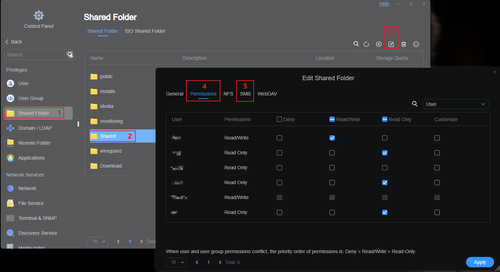
Move to SMB tab [5]
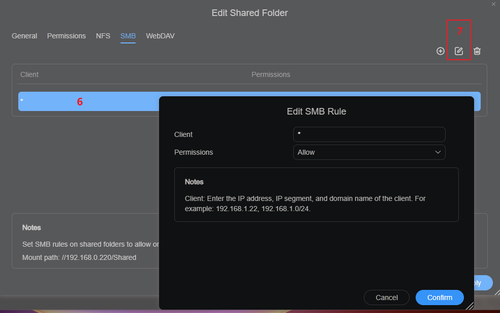
select the Client Rule [6] and open the rule settings [7]
The above rule example is allowing the Clients from any network, probably is good to start like that before to tighten it.
Don't forget the [Confirm] button in the end and share the result here
Cheers
You wrote Windows File Explorer and that basically means SMB access (the old name was CIFS)
The control is on two levels in TOS... This is example from v6 Control Panel, but the other versionis looks similar.
Go to the Shared Folder setting [1] and for any specific folder (the example is for Shared), select it [2] and validate your user permissions [4]
Move to SMB tab [5]
select the Client Rule [6] and open the rule settings [7]
The above rule example is allowing the Clients from any network, probably is good to start like that before to tighten it.
Don't forget the [Confirm] button in the end and share the result here
Cheers
______________________
F5-221; 10G RAM; 5 x 4TB TRAID; Riser, Power and/or ASMedia HW failure undetected by TM Support
F6-424; 32G RAM; 2 x 512GB 8Gb/s M.2; 6 x 4TB raidz2; TrueNAS 25.10.1
¯¯¯¯¯¯ Jellyfin, Pi-Hole, Unifi Controller, Zabbix
F5-221; 10G RAM; 5 x 4TB TRAID; Riser, Power and/or ASMedia HW failure undetected by TM Support
F6-424; 32G RAM; 2 x 512GB 8Gb/s M.2; 6 x 4TB raidz2; TrueNAS 25.10.1
¯¯¯¯¯¯ Jellyfin, Pi-Hole, Unifi Controller, Zabbix
Re: [Help] can't access through windows file explorer
replying to AlAleksiev
I found the first step you mentioned but can't find the second step
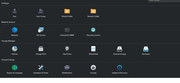
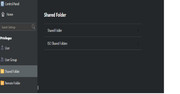
I tried going to the above and was able to change the permissions of each folder.
I did not see what you were showing me for SMB in there but also went into File Service in the control panel and there is a section for SMB but could not find client rule or rule setting in either place.
I found the first step you mentioned but can't find the second step
I tried going to the above and was able to change the permissions of each folder.
I did not see what you were showing me for SMB in there but also went into File Service in the control panel and there is a section for SMB but could not find client rule or rule setting in either place.
Re: [Help] can't access through windows file explorer
still having issues with windows security login popup
-
AlAleksiev
- Posts: 44
- Joined: 19 Feb 2024, 00:15
Re: [Help] can't access through windows file explorer
In the second screenshot you have on the right side
Shared Folder >
Click it to enter in the detailed setting and you'll find the SMB there.
Share a screenshot from that SMB section if you cannot figure out the rules
Cheers
Shared Folder >
Click it to enter in the detailed setting and you'll find the SMB there.
Share a screenshot from that SMB section if you cannot figure out the rules
Cheers
______________________
F5-221; 10G RAM; 5 x 4TB TRAID; Riser, Power and/or ASMedia HW failure undetected by TM Support
F6-424; 32G RAM; 2 x 512GB 8Gb/s M.2; 6 x 4TB raidz2; TrueNAS 25.10.1
¯¯¯¯¯¯ Jellyfin, Pi-Hole, Unifi Controller, Zabbix
F5-221; 10G RAM; 5 x 4TB TRAID; Riser, Power and/or ASMedia HW failure undetected by TM Support
F6-424; 32G RAM; 2 x 512GB 8Gb/s M.2; 6 x 4TB raidz2; TrueNAS 25.10.1
¯¯¯¯¯¯ Jellyfin, Pi-Hole, Unifi Controller, Zabbix
Re: [Help] can't access through windows file explorer
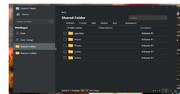
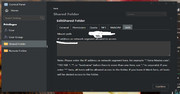
This is what I find in there. I don't see it there either.
-
AlAleksiev
- Posts: 44
- Joined: 19 Feb 2024, 00:15
Re: [Help] can't access through windows file explorer
In the "IP address or network segment allowed to access" field just place one star [*] and confirm it
______________________
F5-221; 10G RAM; 5 x 4TB TRAID; Riser, Power and/or ASMedia HW failure undetected by TM Support
F6-424; 32G RAM; 2 x 512GB 8Gb/s M.2; 6 x 4TB raidz2; TrueNAS 25.10.1
¯¯¯¯¯¯ Jellyfin, Pi-Hole, Unifi Controller, Zabbix
F5-221; 10G RAM; 5 x 4TB TRAID; Riser, Power and/or ASMedia HW failure undetected by TM Support
F6-424; 32G RAM; 2 x 512GB 8Gb/s M.2; 6 x 4TB raidz2; TrueNAS 25.10.1
¯¯¯¯¯¯ Jellyfin, Pi-Hole, Unifi Controller, Zabbix
Re: [Help] can't access through windows file explorer
done and still stuck.
It something to do with login because I am having issue with the windows security popup and on my firecube on VLC and NOVA players I can't login on any of them even though I try to use the same info I use to login to the web portal.
It something to do with login because I am having issue with the windows security popup and on my firecube on VLC and NOVA players I can't login on any of them even though I try to use the same info I use to login to the web portal.
-
AlAleksiev
- Posts: 44
- Joined: 19 Feb 2024, 00:15
Re: [Help] can't access through windows file explorer
What exactly the Windows is showing to you?
______________________
F5-221; 10G RAM; 5 x 4TB TRAID; Riser, Power and/or ASMedia HW failure undetected by TM Support
F6-424; 32G RAM; 2 x 512GB 8Gb/s M.2; 6 x 4TB raidz2; TrueNAS 25.10.1
¯¯¯¯¯¯ Jellyfin, Pi-Hole, Unifi Controller, Zabbix
F5-221; 10G RAM; 5 x 4TB TRAID; Riser, Power and/or ASMedia HW failure undetected by TM Support
F6-424; 32G RAM; 2 x 512GB 8Gb/s M.2; 6 x 4TB raidz2; TrueNAS 25.10.1
¯¯¯¯¯¯ Jellyfin, Pi-Hole, Unifi Controller, Zabbix
Re: [Help] can't access through windows file explorer
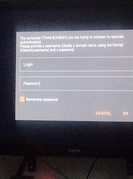
First is windows second is VLC on Fire cube