Page 1 of 2
[Help] Can't connect to UPS server
Posted: 12 Dec 2025, 15:26
by tw33k
I've had a F4-424 Max for a little over a week and for the life of me, I can't get it connect to my UPS server. Other clients work perfectly but not this one.
I've checked the nut.conf and upsmon.conf files many times and they are correct but it appears the NAS is trying to connect to something other than what's in the upsmon.conf file.
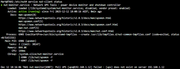
it should be <myups@ip_address> so it looks like I'm missing something.
Any suggestions?
Re: [Help] Can't connect to UPS server
Posted: 12 Dec 2025, 15:51
by TMzethar
Please tell me the TOS version.
The recently released 6.0.794 has modifications for UPS. If you are still using an earlier TOS 6 version, please update and try again.
viewtopic.php?t=9374
Re: [Help] Can't connect to UPS server
Posted: 12 Dec 2025, 23:59
by tw33k
TMzethar wrote: ↑12 Dec 2025, 15:51
Please tell me the TOS version.
The recently released 6.0.794 has modifications for UPS. If you are still using an earlier TOS 6 version, please update and try again.
viewtopic.php?t=9374
yes, that is the version I'm using.
Re: [Help] Can't connect to UPS server
Posted: 13 Dec 2025, 08:28
by tw33k
on the TNAS, when I run 'upsc myups@ip_address', I get all the info from the UPS so I'm not sure why the Enable UPS on the TNAS keeps failing
Re: [Help] Can't connect to UPS server
Posted: 13 Dec 2025, 13:14
by TMLila
tw33k wrote: ↑13 Dec 2025, 08:28
on the TNAS, when I run 'upsc myups@ip_address', I get all the info from the UPS so I'm not sure why the Enable UPS on the TNAS keeps failing
Hello! We apologize for not being able to resolve the issue you encountered in a timely manner. Please log into your TOS system, navigate to Technical Support > Issue Report, generate and download the log report, then send it to our technical support email (
[email protected]) for analysis. Kindly include the link to this forum post in the email body to help us reference the issue context.
Re: [Help] Can't connect to UPS server
Posted: 14 Dec 2025, 01:17
by tw33k
OK...thanks
Re: [Help] Can't connect to UPS server
Posted: 17 Dec 2025, 10:13
by TMzethar
We found that the UPS name on the server is not 'ups'. Please check the server. It is simultaneously connected to UPS names 'myups' and 'ups'.
It seems you are using a custom UPS service. If that is the case, please do not use TOS's UPS front-end page. After completing the direct configuration, please restart nut-monitor in the Terminal.
Re: [Help] Can't connect to UPS server
Posted: 21 Dec 2025, 12:41
by tw33k
there is no problem with the server. 2 other clients connect to it.
how do I stop the Terramaster attempting to connect to 'ups'? It should only connect to 'myups'
Re: [Help] Can't connect to UPS server
Posted: 22 Dec 2025, 09:41
by TMzethar
Modify the /etc/nut/upsmon.conf
Change "
[email protected]" to "
[email protected]",
Then restart the service.
systemctl restart nut-monitor.service
Re: [Help] Can't connect to UPS server
Posted: 31 Jan 2026, 21:02
by tw33k
This remains a problem. I just had a power failure while I was asleep. When I woke up and realised, I saw that the F4-424 Max was powered off.
The upsmon.conf file has no reference to "
[email protected]" It is as it should be.