

I encountered warning errors on one of my drives in a RAID 5 configuration. I also found the system frequently rebooting itself. I installed some NVMes and moved the "system drives" to them and the frequency of unexpected shutdown/reboots was reduced significantly.
I moved as much as I could to the new Volumes on the NVMes, like sytem drives, applications, logs, and any docker containers, etc. Only "pure" data storage which is only added to about once every week or two, for basically "warm" storage remained on the RAID 5 array. And again unexpected shutdowns and reboots were much less common, going from usually within every 24 hours, to 7 days and counting with zero issue.
I also wanted to say how easy it was to remove the drive with the SMART/bad sector warning in the GUI, pop it out of the enclosure, insert a new drive, and add the new drive to the array to rebuild/resync it - Which should take about 50 hours to resync ~20TBs.
Then I plan to do the same remove, disconnect, and reconnect a new bigger drive, and then resync, for each of the other drives to make available much more space to expand the RAID 5 array into. Currently I expect it will take a total of a few hundred hours until fully complete.
So 2 things.
1 - Why is a drive with bad sectors not able to properly mark them as bad and prevent rebooting/system instability?
2 - Why can't the hyper cache on the NVMes be designated a more reasonable size like 1-200 GB? Forced to use the entire NVMe ( possibly, multiple terrabytes ) and not be able to use the NVMes for system drives, seems like a big miss.
[Discussion] RAID 5 Smart bad sector on drive warning - Replace/Upgrade & NVMe hypercache sizing

Re: [Discussion] RAID 5 Smart bad sector on drive warning - Replace/Upgrade & NVMe hypercache sizing
What model of TNAS and version of TOS system are you using?
Under normal circumstances, when an HDD is clearly non-functional, the system will mark it as faulty and issue a prompt. Additionally, if abnormal indicators are observed from Smart information, it will also be marked as a warning.
Currently, it is not supported to use part of an M.2 NVMe SSD for caching while using another part for other purposes.
Under normal circumstances, when an HDD is clearly non-functional, the system will mark it as faulty and issue a prompt. Additionally, if abnormal indicators are observed from Smart information, it will also be marked as a warning.
Currently, it is not supported to use part of an M.2 NVMe SSD for caching while using another part for other purposes.
To contact our team, please send email to following addresses, remember to replace (at) with @:
Technical team: support(at)terra-master.com (for technical support)
Service team: service(at)terra-master.com (for purchasing, return, replacement, RMA service)
Technical team: support(at)terra-master.com (for technical support)
Service team: service(at)terra-master.com (for purchasing, return, replacement, RMA service)
Re: [Discussion] RAID 5 Smart bad sector on drive warning - Replace/Upgrade & NVMe hypercache sizing
This specific case is a F6-424, I have also encountered this on a F2-223, both running the latest TOS 6.0.783-00001. Even when a drive is marked with a warning and shown in the TOS GUI, the bad sectors do not get avoided.
From the local HDMI display/terminal there will be many I/O errors displayed on the screen and over time it just shows more and more. Until it crashes and reboots. It shows some system or RAID driver process continues trying to access a bad sector when there is a media error.
The log shows it repeatedly until the device is removed then it shows disk failure notification and disabling the device and operation continuing on the remaining devices until a new drive is replaced and the resync is started.
Once it finishes rebuilding, I expect I can reboot and then there will be no more errors showing up in the terminal/TTY HDMI display and it will not be rebooting randomly. That has been my experience with both devices.
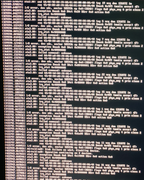
From the local HDMI display/terminal there will be many I/O errors displayed on the screen and over time it just shows more and more. Until it crashes and reboots. It shows some system or RAID driver process continues trying to access a bad sector when there is a media error.
Code: Select all
I/O error, dev sdc, sector 585936 op 0x0:(READ) flags 0x0 phys_seg 1 prio class 2
ata3.00: exception Emask 0x0 SAct 0x2 SErr 0x0 action 0x0
ata3.00: irq_stat 0x40000008
ata3.00: failed command:unknown
ata3.00: cmd 60/00:80:00:f0:08/01:00:00:00:00/40  tag 16 ncq dma 131072 in
res 43/40:00:d0:f0:08/00:01:00:00:00/00 Emask 0x409 (media error) <F>Once it finishes rebuilding, I expect I can reboot and then there will be no more errors showing up in the terminal/TTY HDMI display and it will not be rebooting randomly. That has been my experience with both devices.
Re: [Discussion] RAID 5 Smart bad sector on drive warning - Replace/Upgrade & NVMe hypercache sizing
NAS system can only determine the health status based on various indicators of the HDD/SSD. However, the I/O connection issue you encountered may be related to the HDD itself, the interface, or contaminants. You can try removing dust, wiping the gold fingers with an eraser, and identify the problem source by comparison to see if it comes from a specific SATA HDD/SSD.
To contact our team, please send email to following addresses, remember to replace (at) with @:
Technical team: support(at)terra-master.com (for technical support)
Service team: service(at)terra-master.com (for purchasing, return, replacement, RMA service)
Technical team: support(at)terra-master.com (for technical support)
Service team: service(at)terra-master.com (for purchasing, return, replacement, RMA service)
Re: [Discussion] RAID 5 Smart bad sector on drive warning - Replace/Upgrade & NVMe hypercache sizing
The HDD works great on any other machine with multiple OSes, and can detect and mark the bad sectors and avoid them, there is clearly a bug with the RAID implementation when there are bad sectors.
The screen shot shows that the errors show the exact same bad sector every time. On other machines when that region of the drive is quarantined, there are ZERO issues with it. The choice with how to report and fix the bug or ignore it in TOS is up to the corporation and those who make it function.. Computer science engineers or even software developers know that if any hardware error is reported, it can be caught and acted upon by a driver or a raid implementation versus ignored and allowed to percolate all the way up un-handled. I would strongly suggest you raise this for appropriate evaluation.
Additionally, having a diagram in TOS that shows the drive bays and the numbers corresponding to the actual physical drive locations would go a long way to being able to easily replace drives. Not being clear which end of an enclosure starts as bay 1 is an unnecessary frustration especially in a time when it is heightened.
The screen shot shows that the errors show the exact same bad sector every time. On other machines when that region of the drive is quarantined, there are ZERO issues with it. The choice with how to report and fix the bug or ignore it in TOS is up to the corporation and those who make it function.. Computer science engineers or even software developers know that if any hardware error is reported, it can be caught and acted upon by a driver or a raid implementation versus ignored and allowed to percolate all the way up un-handled. I would strongly suggest you raise this for appropriate evaluation.
Additionally, having a diagram in TOS that shows the drive bays and the numbers corresponding to the actual physical drive locations would go a long way to being able to easily replace drives. Not being clear which end of an enclosure starts as bay 1 is an unnecessary frustration especially in a time when it is heightened.


Re: [Discussion] RAID 5 Smart bad sector on drive warning - Replace/Upgrade & NVMe hypercache sizing
Hello, thank you for your suggestions. We will feed this requirement back to the product team, who will evaluate whether there is a better way to alert about potential hard disk risks.
Regarding your second suggestion, in fact, in TOS 7, we have restructured the storage management module, which can display the corresponding slot position. Please wait for the new version to be released.
Regarding your second suggestion, in fact, in TOS 7, we have restructured the storage management module, which can display the corresponding slot position. Please wait for the new version to be released.
To contact our team, please send email to following addresses, remember to replace (at) with @
Technical team: support(at)terra-master.com(for technical support)
Service team: service(at)terra-master.com(for purchasing, return, replacement, RMA service)
Technical team: support(at)terra-master.com(for technical support)
Service team: service(at)terra-master.com(for purchasing, return, replacement, RMA service)