[Help] TNAS PC TerraSync On-Demand feature not working
Posted: 25 Nov 2025, 00:35
Hello,
I tried to add a bidirectionnal synchronized folder on Windows with TNAS PC and on-demand feature enabled.
On initialization, it works perfectly, I can set files as distant, they are removed from my disk and I can get them back without any issue.
But as soon I close and launch TNAS PC again (manually or through a reboot), it will download all of my distant files on my computer from the synchronized folder. This resulted in a saturation of my computer's disk space.
I also had files that lost their ability to be setted as distant after some attempts to fix the issue.
[Version]
TerraMaster NAS : F4-424
TerraSync Server : 2.1.506
TerraSync Client : 5.2.506
Steps to reproduce :
- Launch TNAS PC
- Add a new bidirectionnal folder with on-demand enabled
- Set files as distant to remove them from the disk
- Close TNAS PC
- Open TNAS PC
- The files from the folder are downloaded
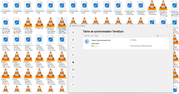
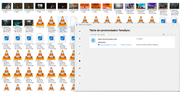
Attached : Before and after TNAS PC relaunch
I tried to add a bidirectionnal synchronized folder on Windows with TNAS PC and on-demand feature enabled.
On initialization, it works perfectly, I can set files as distant, they are removed from my disk and I can get them back without any issue.
But as soon I close and launch TNAS PC again (manually or through a reboot), it will download all of my distant files on my computer from the synchronized folder. This resulted in a saturation of my computer's disk space.
I also had files that lost their ability to be setted as distant after some attempts to fix the issue.
[Version]
TerraMaster NAS : F4-424
TerraSync Server : 2.1.506
TerraSync Client : 5.2.506
Steps to reproduce :
- Launch TNAS PC
- Add a new bidirectionnal folder with on-demand enabled
- Set files as distant to remove them from the disk
- Close TNAS PC
- Open TNAS PC
- The files from the folder are downloaded
Attached : Before and after TNAS PC relaunch