Need Help: PLEX issue mapped drives


Need Help: PLEX issue mapped drives
I installed PLEX on my F2-223 TMNAS running TOS 6 as per instructions. My issue is that when I go to add media to my PLEX library it only "sees" the media folders that are installed on the TMNAS. I cannot get PLEX to detect the other media folders that are on my network. When I was running PLEX installed on my PC it easily detected all the media mapped drives on the network. How do I get PLEX on my TMNAS to see the other mapped drives on my network? Any help would be greatly appreciated.


Re: Need Help: PLEX issue mapped drives
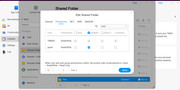
In TOS 6, we have added application user permissions. Please check in the shared folder permissions whether the application user has read and write access to the corresponding shared folder.
To contact our team, please send email to following addresses, remember to replace (at) with @
Technical team: support(at)terra-master.com(for technical support)
Service team: service(at)terra-master.com(for purchasing, return, replacement, RMA service)
Technical team: support(at)terra-master.com(for technical support)
Service team: service(at)terra-master.com(for purchasing, return, replacement, RMA service)
Re: Need Help: PLEX issue mapped drives
Hi, thanks for getting back to me. This is a screenshot of the folder permissions.