

Hello
I have TerraMaster F4-424 Plus with an Intel N150 processor. I noticed that in the geekbench 6 test it shows very weak performance in multi-threaded mode
TerraMaster F4-425 Plus (TOS6) https://browser.geekbench.com/v6/cpu/15073258
Single: 1143 - OK
Multi: 2083 - not OK
TerraMaster F4-425 Plus (TOS7) https://browser.geekbench.com/v6/cpu/15029321
Single: 1008 - OK
Multi: 1742 - not OK
At the same time, other manufacturers' tests with the Intel N150 processor show 30-40% more performance in multi-threaded mode.
Tell me how to fix low performance on TerraMaster F4-424 Plus?
Here are, for example, tests with good performance Intel N150 https://browser.geekbench.com/v6/cpu/15137540
Single: 1304 - OK
Multi: 3255 - OK
[Help] F4-425 Plus Intel N150 low performance [SOLVED]


Re: [Help] F4-425 Plus Intel N150 low performance
Hello, considering power consumption, heat dissipation, and service life, we have limited the PL value. If you need to unleash multi-core performance, you can manually adjust a larger PL value.
To contact our team, please send email to following addresses, remember to replace (at) with @
Technical team: support(at)terra-master.com(for technical support)
Service team: service(at)terra-master.com(for purchasing, return, replacement, RMA service)
Technical team: support(at)terra-master.com(for technical support)
Service team: service(at)terra-master.com(for purchasing, return, replacement, RMA service)
Re: [Help] F4-425 Plus Intel N150 low performance
I couldn't find how and where I can return the processor performance to the normal correct state. Can you tell me where to do it?
It's best if it can be done from TOS, but unfortunately I didn't find such a setting
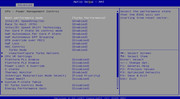
It's best if it can be done from TOS, but unfortunately I didn't find such a setting
Re: [Help] F4-425 Plus Intel N150 low performance
This setting needs to be changed in the BIOS. In the screenshot you provided, set both Platform PL1 Enable and Platform PL1 Enable to the Enabled state.
To contact our team, please send email to following addresses, remember to replace (at) with @
Technical team: support(at)terra-master.com(for technical support)
Service team: service(at)terra-master.com(for purchasing, return, replacement, RMA service)
Technical team: support(at)terra-master.com(for technical support)
Service team: service(at)terra-master.com(for purchasing, return, replacement, RMA service)
Re: [Help] F4-425 Plus Intel N150 low performance
I turned on PL1 and PL2. Then I set the Power parameter to 0 > 20000 and 0 > 25000, but it didn't help, on the contrary, the performance got worse.
Could you tell me exactly what parameters and how they need to be set, so that the N150 would work as stated by Intel and give out 3300 in multi-threaded mode as N95 does in TerraMaster F4-424
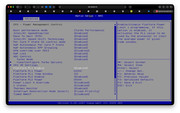
Could you tell me exactly what parameters and how they need to be set, so that the N150 would work as stated by Intel and give out 3300 in multi-threaded mode as N95 does in TerraMaster F4-424

Re: [Help] F4-425 Plus Intel N150 low performance
Hello, you can appropriately change Platform PL1 Power and Platform PL2 Power to higher values, but you need to note that power consumption and heat generation are proportional. The larger the value, the higher the heating temperature. You can increase this value slightly.
To contact our team, please send email to following addresses, remember to replace (at) with @:
Technical team: support(at)terra-master.com(for technical support)
Service team: service(at)terra-master.com(for purchasing, return, replacement, RMA service)
Technical team: support(at)terra-master.com(for technical support)
Service team: service(at)terra-master.com(for purchasing, return, replacement, RMA service)
Re: [Help] F4-425 Plus Intel N150 low performance
Hello
I changed different PL settings, but it didn't increase performance.
I understand very well that an increase in power will lead to an increase in heating.
Tell me what values I should set in PL or somewhere else, so that my F4-425 Plus would give performance at least at the level of the old processor n95 from the F4-424 line.
What values should I set and where should I install it?
I changed different PL settings, but it didn't increase performance.
I understand very well that an increase in power will lead to an increase in heating.
Tell me what values I should set in PL or somewhere else, so that my F4-425 Plus would give performance at least at the level of the old processor n95 from the F4-424 line.
What values should I set and where should I install it?


Re: [Help] F4-425 Plus Intel N150 low performance
After adjusting PL1 to 15W, I achieved a good performance score:
Multi-core score: 3100 |Multi-core score: 3093 |Multi-core score: 3093
Single-core score: 1050 |Single-core score: 1049 |Single-core score: 1037
1,Press Del to enter BIOS during startup.
2,Navigate to the following path:Advanced → Power & Performance → CPU-Power Management Control → View/Configure Turbo Options.
3,Set Power Limit 1 Override Enabled.
4,set the item "Power Limit 1" to 15000.
Multi-core score: 3100 |Multi-core score: 3093 |Multi-core score: 3093
Single-core score: 1050 |Single-core score: 1049 |Single-core score: 1037
1,Press Del to enter BIOS during startup.
2,Navigate to the following path:Advanced → Power & Performance → CPU-Power Management Control → View/Configure Turbo Options.
3,Set Power Limit 1 Override Enabled.
4,set the item "Power Limit 1" to 15000.
Last edited by shou on 25 Nov 2025, 19:16, edited 2 times in total.
Re: [Help] F4-425 Plus Intel N150 low performance
Unfortunately, I didn't find "Config TDP Configurations." in BIOS F4-425 Plus. Tell me, where did you make these settings?shou wrote: ↑25 Nov 2025, 13:58 After adjusting PL1 to 15W, I achieved a good performance score:
Multi-core score: 3100 |Multi-core score: 3093 |Multi-core score: 3093
Single-core score: 1050 |Single-core score: 1049 |Single-core score: 1037
1,Press Del to enter BIOS during startup.
2,Navigate to the following path:Advanced → Power & Performance → CPU-Power Management Control → Config TDP Configurations.
3,Set the first "Power Limit 1" to 15000.
Nevertheless, I once again set the PL1 value to 15000 and it didn't give any results. https://browser.geekbench.com/v6/cpu/15223629
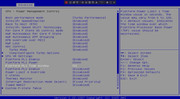
I don't know what to do. My F4-425 Plus is very weak, it doesn't match its characteristics and I'm disappointed in it.