Docker Engine installs to wrong Volume
Posted: 19 Nov 2025, 07:17
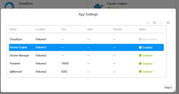
I have moved applications from /Volume1 to /Volume2 by uninstalling them and ensuring the
App Center -> Settings -> The location where applications are installed is set to /Volume2
But, Docker Engine keeps re-installing to /Volume1
How can I ensure that this installs to /Volume2 like other apps do after they have been uninstalled from /Volume1.
Is there a command line way to install the tpk and ensure that it is installed to /Volume2?
App Center -> Settings -> The location where applications are installed is set to /Volume2
But, Docker Engine keeps re-installing to /Volume1
How can I ensure that this installs to /Volume2 like other apps do after they have been uninstalled from /Volume1.
Is there a command line way to install the tpk and ensure that it is installed to /Volume2?