

Please move if this is in the wrong subforum - I made a best guess
I decided to install Plex a few days ago and it wasn't playing the local files, despite scanning the folders accurately. Blahblahblah, I thought I'd try to restart the NAS as a why-not step. Welllll, it wouldn't load up after that (even though I have it power off overnight). Found the reset trick of pulling the drives and reconfiguring. Most things were back in place in time ... it's primarily a media server for me, and to hold backups of my docs/etc.
But, now, when I go to look at my mapped network drive (N:), Windows' file explorer takes about 75 seconds to navigate from directory to directory, every time. Loading a file once there is not slowed down - it is the navigation itself that takes a long time. This was not a problem before. I'd appreciate any input as to what may need changed.
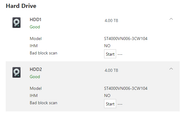
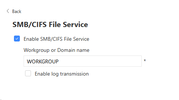
I have checked both of the 4TB drives (RAID) for bad blocks and their SMART is fine. SMB is on. My VPN is told to allow LAN traffic (and it's the same with it turned off).
And, of course, this happened two days after my warranty expires.
[Help] F2-210 crashed, reset, now folder navigation super slow


Re: [Help] F2-210 crashed, reset, now folder navigation super slow
You can try clearing the SMB cache or deleting the current credentials and then remap the network drive.
Also, please check if the NAS is currently rebuilding or synchronizing the array, as this may consume system resources and cause slow performance.
Also, please check if the NAS is currently rebuilding or synchronizing the array, as this may consume system resources and cause slow performance.
To contact our team, please send email to following addresses, remember to replace (at) with @
Technical team: support(at)terra-master.com(for technical support)
Service team: service(at)terra-master.com(for purchasing, return, replacement, RMA service)
Technical team: support(at)terra-master.com(for technical support)
Service team: service(at)terra-master.com(for purchasing, return, replacement, RMA service)
Re: [Help] F2-210 crashed, reset, now folder navigation super slow
SMB cache cleared, mapped drive disconnected/reconnected. Drives show as not being tested.
I should have mentioned that this long delay occurs whether I access it as a mapped drive or via \\nas\public'\
I'll also add that Kodi media player on my smart tv has no delays when accessing the media on the NAS.
For a minute things did seem better I'd get to a folder three or four levels deep (e.g. N:\media\tv\show\season and it'd be back to normal BUT when I went to go back to N:\ or N:\media, I'd get the delay again. The delays are very consistent at the topmost levels (which doesn't make sense to me)
I should have mentioned that this long delay occurs whether I access it as a mapped drive or via \\nas\public'\
I'll also add that Kodi media player on my smart tv has no delays when accessing the media on the NAS.
For a minute things did seem better I'd get to a folder three or four levels deep (e.g. N:\media\tv\show\season and it'd be back to normal BUT when I went to go back to N:\ or N:\media, I'd get the delay again. The delays are very consistent at the topmost levels (which doesn't make sense to me)

Re: [Help] F2-210 crashed, reset, now folder navigation super slow
Will changing other shared folder directories also cause loading delays? Maybe you can try the following methods:
1. Try method 4 of the link below for re-mapping: https://toshelp.terra-master.com/docs/T ... rvices/smb
2. In the folder options of the Windows File Explorer → View → Check "Always show icons, never show thumbnails" .
3. In the File Services of the TOS Control Panel, adjust "Maximum SMB Protocol" to SMB3 and "Minimum SMB Protocol" to SMB2 .
4. Restart Windows.
1. Try method 4 of the link below for re-mapping: https://toshelp.terra-master.com/docs/T ... rvices/smb
2. In the folder options of the Windows File Explorer → View → Check "Always show icons, never show thumbnails" .
3. In the File Services of the TOS Control Panel, adjust "Maximum SMB Protocol" to SMB3 and "Minimum SMB Protocol" to SMB2 .
4. Restart Windows.
To contact our team, please send email to following addresses, remember to replace (at) with @
Technical team: support(at)terra-master.com (for technical support)
Service team: service(at)terra-master.com (for purchasing, return, replacement)
Technical team: support(at)terra-master.com (for technical support)
Service team: service(at)terra-master.com (for purchasing, return, replacement)
Re: [Help] F2-210 crashed, reset, now folder navigation super slow
1. Accessing the nas by its IP (\\192.168.0.2) made no difference, regardless of how/where I entered the address.
2. All of these folders use Detail view so thumbnails are not shown but, for the record, turning thumbnails off made no difference.
3. The F2-210 has TOS v 4.2.44 which does not provide that option
4. Windows has been restarted a couple of times.
As this was not a problem until the NAS was reinitialized, I'm pretty sure it's a setting on the NAS and not on the PC.
2. All of these folders use Detail view so thumbnails are not shown but, for the record, turning thumbnails off made no difference.
3. The F2-210 has TOS v 4.2.44 which does not provide that option
4. Windows has been restarted a couple of times.
As this was not a problem until the NAS was reinitialized, I'm pretty sure it's a setting on the NAS and not on the PC.
Re: [Help] F2-210 crashed, reset, now folder navigation super slow
Thank you for your detailed testing. Based on your description, this appears to be an issue with the ACL permissions of the shared folder, causing the top-level directory to be sluggish while the deeper subdirectories function normally. Please go to the permission editing section of the corresponding shared folder, check the option to 'Replace all subdirectory permissions with those of this folder' and apply it.
To contact our team, please send email to following addresses, remember to replace (at) with @
Technical team: support(at)terra-master.com(for technical support)
Service team: service(at)terra-master.com(for purchasing, return, replacement, RMA service)
Technical team: support(at)terra-master.com(for technical support)
Service team: service(at)terra-master.com(for purchasing, return, replacement, RMA service)
Re: [Help] F2-210 crashed, reset, now folder navigation super slow
Done. However, after doing so, loading of the Public folder takes as long as it did before.
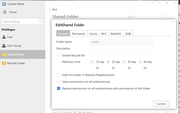
If this is not the correct place to make that change, please let me know.
So, it takes at least a minute to load the N:\ folder (\\nas\public), same for n:\music or n:\media but (let's call them third-level folders) n:\media\tvshows or below do start loading a lot faster.
If this is not the correct place to make that change, please let me know.
So, it takes at least a minute to load the N:\ folder (\\nas\public), same for n:\music or n:\media but (let's call them third-level folders) n:\media\tvshows or below do start loading a lot faster.

Re: [Help] F2-210 crashed, reset, now folder navigation super slow
We need to learn more specific details to diagnose the problem.
Please generate and download the system report package in TOS Desktop > Technical Support > Report Issues, then download and send it to us for inspection.
Technical team: support(at)terra-master.com
Please generate and download the system report package in TOS Desktop > Technical Support > Report Issues, then download and send it to us for inspection.
Technical team: support(at)terra-master.com
To contact our team, please send email to following addresses, remember to replace (at) with @:
Technical team: support(at)terra-master.com (for technical support)
Service team: service(at)terra-master.com (for purchasing, return, replacement, RMA service)
Technical team: support(at)terra-master.com (for technical support)
Service team: service(at)terra-master.com (for purchasing, return, replacement, RMA service)
Re: [Help] F2-210 crashed, reset, now folder navigation super slow
I'd be happy to send it but, when it's generated the report, nothing happens when I click the Download button ... on Chrome and Edge and also on my phone. The NAS refuses to hand it over.
Re: [Help] F2-210 crashed, reset, now folder navigation super slow
Usually, after clicking to download, the download will be performed through the browser used to log in to NAS. Please check if the download has been blocked by the browser.
To contact our team, please send email to following addresses, remember to replace (at) with @
Technical team: support(at)terra-master.com(for technical support)
Service team: service(at)terra-master.com(for purchasing, return, replacement, RMA service)
Technical team: support(at)terra-master.com(for technical support)
Service team: service(at)terra-master.com(for purchasing, return, replacement, RMA service)