[Help] Delete files beyond a certain age
Posted: 05 Nov 2025, 03:16
I have a couple of cameras set to record motion events and save the videos to certain folders on my NAS (F4 210 running TOS v4.2.43), and then delete them past a certain age. I was attempting to use this script run via cron (front door as an example):
However, it wasn't working, so I attempted to run it via command line to see if I could figure out what the problem was, and I get this error:
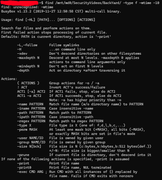
If I remove mtime from the command then I get the same error but for -delete.
What am I doing wrong? Is it just impossible to do what I'm trying to do? It seems like the version of BusyBox find doesn't support mtime or delete, so is there a way to install a different version of find that does have those functions? Thanks for any help!
Code: Select all
find /mnt/md0/SecurityVideos/FrontDoor/ -type f -mtime +6 -deleteIf I remove mtime from the command then I get the same error but for -delete.
What am I doing wrong? Is it just impossible to do what I'm trying to do? It seems like the version of BusyBox find doesn't support mtime or delete, so is there a way to install a different version of find that does have those functions? Thanks for any help!