[Help] Delete files beyond a certain age

SMB, NFS, FTP, web file manager and Rsync server.
Post Reply
User avatar
TheMightyEthan
Posts: 8
Joined: 05 Nov 2025, 02:44
United States of America

[Help] Delete files beyond a certain age

Post by TheMightyEthan »

I have a couple of cameras set to record motion events and save the videos to certain folders on my NAS (F4 210 running TOS v4.2.43), and then delete them past a certain age. I was attempting to use this script run via cron (front door as an example):

Code: Select all

find /mnt/md0/SecurityVideos/FrontDoor/ -type f -mtime +6 -delete
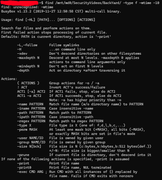
However, it wasn't working, so I attempted to run it via command line to see if I could figure out what the problem was, and I get this error:

Image

If I remove mtime from the command then I get the same error but for -delete.

What am I doing wrong? Is it just impossible to do what I'm trying to do? It seems like the version of BusyBox find doesn't support mtime or delete, so is there a way to install a different version of find that does have those functions? Thanks for any help!
User avatar
Gremlin
Gold Member
Posts: 1628
Joined: 02 Dec 2022, 22:31
Great Britain

Re: [Help] Delete files beyond a certain age

Post by Gremlin »

Just a suggestion: instead of -delete, use -print for testing.
Set up the command as a scheduled task via TOS control panel rather than cron. Scheduled tasks allow you to direct output for diagnostics or reporting.
This is a typical command I use:

Code: Select all

find /Volume1/CCTVi/ -name P*.jpg -mtime +6 -print -delete
Note I use /Volume[n]/.... addressing. I run several find commands on separate lines within 1 scheduled task (as in a script).
F5-221 TOS7.0.0777 - 4x4TB (Ironwolf) Traid
F2-424 TOS7.0.0777 - 2x500GB nvme (P3) Traid, 2x6TB HDD (HGST) Traid
F2-221 TOS7.0.0777 - 1x3TB Ext4, 1x4TB Btrfs
F2-425+ TOS7.0.0777 - 2x500GB nvme (P3) Traid, 2x6TB HDD (EXOS) Traid
User avatar
TheMightyEthan
Posts: 8
Joined: 05 Nov 2025, 02:44
United States of America

Re: [Help] Delete files beyond a certain age

Post by TheMightyEthan »

Thanks, I tried to find a task scheduler in the control panel but couldn't. I ended up solving it with the help of some people on a couple of discords I'm in. I wrote a shell script and just point cron to run that. So in the shell script I have:

Code: Select all

#!/bin/bash

NOW=`date +%s`;
echo "`date`" >> /mnt/md0/SecurityVideos/deletedfiles.txt;

for f in /mnt/md0/SecurityVideos/*/*; do
    MTIME=`date -r "$f" +%s`;
    if [ $(( $NOW - $MTIME )) -gt $(( 7 * 24*60*60 )) ]; then
        echo "$f" >> /mnt/md0/SecurityVideos/deletedfiles.txt;
        rm "$f";
    fi;
done
echos just for logging purposes. Then in cron it's just:

Code: Select all

00 3 * * * Ethan /mnt/md0/SecurityVideos/oldfiledeletion.sh
I did some testing (with the rm removed at first, just the echo) and it seems to be working.
User avatar
Gremlin
Gold Member
Posts: 1628
Joined: 02 Dec 2022, 22:31
Great Britain

Re: [Help] Delete files beyond a certain age

Post by Gremlin »

Sorry, my bad - I didn't notice the tos version you were running.
F5-221 TOS7.0.0777 - 4x4TB (Ironwolf) Traid
F2-424 TOS7.0.0777 - 2x500GB nvme (P3) Traid, 2x6TB HDD (HGST) Traid
F2-221 TOS7.0.0777 - 1x3TB Ext4, 1x4TB Btrfs
F2-425+ TOS7.0.0777 - 2x500GB nvme (P3) Traid, 2x6TB HDD (EXOS) Traid
Post Reply

Return to “File Services”