

Hi Everyone,
I'm new with Terramaster device and i have F2-424 NAS, which seems to be issue working with Mac OSx.
I created a share folder which i'm mounting it with the superuser, using user/passw and when i'm trying to copy folders to the share, i'm receiving below error message on mac:
The operation can’t be completed because you don’t have permission to access some of the items.
Using windows i'm not having any issues, only on Mac.
Could you please advise how can i resolve this issue?
I'm using the latest TOS - 6.0.783-01200
Thanks in advanced.
Cannot copy folders to the share using MacOSx

Re: Cannot copy folders to the share using MacOSx
Did you mount the shared folder using Finder's "Go > Connect to Server" method? Could you provide a screenshot of the interface where the error message appears? This would help us better understand the problem.
To contact our team, please send email to following addresses, remember to replace (at) with @:
Technical team: support(at)terra-master.com(for technical support)
Service team: service(at)terra-master.com(for purchasing, return, replacement, RMA service)
Technical team: support(at)terra-master.com(for technical support)
Service team: service(at)terra-master.com(for purchasing, return, replacement, RMA service)
Re: Cannot copy folders to the share using MacOSx
Yes, i mounted it via "connect to server" method, using the user/passw i created with full permissions.
Attached is the screenshot from MacOSx.
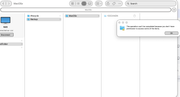
Attached is the screenshot from MacOSx.
Re: Cannot copy folders to the share using MacOSx
To resolve the issue more efficiently, we recommend contacting customer service via the LiveChat feature on our official website (https://www.terra-master.com/) to schedule a remote inspection with an engineer.
To contact our team, please send email to following addresses, remember to replace (at) with @:
Technical team: support(at)terra-master.com(for technical support)
Service team: service(at)terra-master.com(for purchasing, return, replacement, RMA service)
Technical team: support(at)terra-master.com(for technical support)
Service team: service(at)terra-master.com(for purchasing, return, replacement, RMA service)
Re: Cannot copy folders to the share using MacOSx
This is what i did, i do have the session tomorrow, but i was wondering if anyone else had this issue and resolved it?