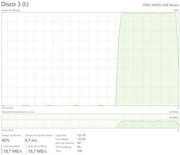
Hi...for a few days now, after about twenty seconds of not touching the computer (Windows 10), my D5-300 starts working on its own, and all the HDD LEDs flash. But as soon as I move the mouse, without clicking or anything else, just moving it a few millimeters, it stops and everything goes back to normal.
I'm a little worried about this extra work...what could it be?
I'm attaching a screenshot of the time it was working.
Thank you.
Hello, this is caused by Windows' background disk access behavior, not an issue with the hardware itself.
When you stop using the mouse or keyboard for about 20 seconds, Windows enters an 'idle detection' state. When you move the mouse, the system detects that the 'user is active again' and immediately pauses background tasks—so the hard disk stops flashing right away.
This brief background access will not put significant strain on the hard drive or shorten its lifespan.
To contact our team, please send email to following addresses, remember to replace (at) with @