Page 1 of 2
[Help] Compatibility 32GB RAM for F2-424
Posted: 17 Oct 2025, 19:33
by Ziptr
Hello,
First of all, I apologize for my poor English. I’m from Spain.
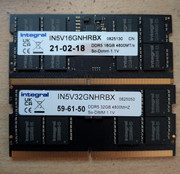
I wanted to ask how it’s possible that my F2-424 works perfectly with an Integral 16GB 4800MHz RAM (shown at the top of the attached image), but does not work with an Integral 32GB 4800MHz RAM (shown at the bottom of the image). They appear to be very similar, so I’m wondering if they should be compatible because they are from the same brand — or if that’s not necessarily the case and the new RAM might actually be incompatible and need to be replaced.
Thank you in advance.
Best regards.
Re: [Help] Compatibility 32GB RAM for F2-424
Posted: 18 Oct 2025, 01:23
by Gremlin
I would be suspicious that the 32GB sodimm is actually counterfeit. The chip speed is printed as 4800MHz whereas comparable ram on Amazon UK is stated as 4800MT/s (as is your 16GB sodimm).
In DDR memory MHz and MT/s are not the same thing.
Re: [Help] Compatibility 32GB RAM for F2-424
Posted: 18 Oct 2025, 01:46
by Ziptr
Hello Gremlin,
Thank you for your answer. In reality I do not think that is the reason since physically the memory has blocks of memory on both sides, which would correspond with a larger memory, but in any case I have proceeded to return it and ask for the one offered by Terramaster’s own store despite being much more expensive. I’m not supposed to have a problem with her.
I will report as soon as I get it and can test it.
A greeting.
Re: [Help] Compatibility 32GB RAM for F2-424
Posted: 18 Oct 2025, 18:29
by shou
Hey, man, I think you can try to re-insert your ram a couple of times, shaking the RAM as you insert it, and waiting 4 minutes at a time. If you can't hear the buzzer, rub your gold finger with an eraser and try again The last way to try, deduct the CMOS battery, rest for 1 minute, then install the CMOS, try to insert the memory,
Re: [Help] Compatibility 32GB RAM for F2-424
Posted: 18 Oct 2025, 18:42
by Ziptr
Hello shou,
I tried to reinstall it several times, waiting up to 20 minutes and nothing. What to clean the contacts with eraser also despite being a new memory with completely shiny contacts (that technique usually works on very used, worn, stained...) and no success, so I have directly returned it and ordered the "official" of Terramaster. As I said in my previous message, I will report how the new memory has worked.
In any case, thank you very much for your answer.
A greeting.
Re: [Help] Compatibility 32GB RAM for F2-424
Posted: 19 Oct 2025, 10:40
by TMjack
Hello! To address the memory compatibility issue, you can try the following steps to improve compatibility with the other memory module: Enter the BIOS setup interface, navigate to Chipset > Memory Configuration, and then change the SA GV option to Disabled.
However, to ensure system stability, we still recommend that you prioritize using memory modules listed in the official compatibility list.
Re: [Help] Compatibility 32GB RAM for F2-424
Posted: 20 Oct 2025, 01:46
by Ziptr
Hello Jack,
How do I access the BIOS settings of the NAS? I would like to check this option if possible while still having the memory here, but I do not know how that process would be done.
Thank you.
A greeting.
Re: [Help] Compatibility 32GB RAM for F2-424 [SOLVED]
Posted: 20 Oct 2025, 19:23
by CursaYang
Hello, you can connect the NAS to a monitor and keyboard. Press the Del key on the keyboard during startup to enter the BIOS.
Re: [Help] Compatibility 32GB RAM for F2-424
Posted: 20 Oct 2025, 19:41
by Ziptr
Hello CursaYang,
Thank you for the answer, I did not know that we could access the BIOS and make the changes that your colleague told me. It is already late because I need to extend when before and I have ordered the memory recommended by the manufacturer, but it is interesting to know for the future.
A greeting.
Re: [Help] Compatibility 32GB RAM for F2-424
Posted: 21 Oct 2025, 04:23
by sianderson
as i was curious about this i came across the fact that it is up to 32gb
is there a second RAM slot and you are trying to put 32gb + original 8gb = 40gb
or are you replacing the only ram chip in the unit to give you a total of 32gb?
it would work with a 16gb chip because 16 + 8 = 24gb so under the 32gb limit if i am reading the specs correctly that there is an upper limit of 32gb on the unit