[Help] DLNA/ Multimedia Srvs
Posted: 02 Oct 2025, 19:21
Sorry I am not very consistant with getting back onto the forum and checking status of posts, BNut I have the following locked post (viewtopic.php?p=26580#p26580)
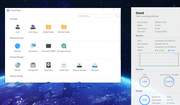
to answer: my TOS Version is 4.2.44-
I greatly appreciate any assitance...
Also another issue, I am trying to and files or entire file folder to the TNAS F2-210 and i am unable to. I am using a different PC from what I usually use, but it is another PC here in my home on the same WiFi Network and I am signed into TNAS PC on this particular PC using my same login. Do i need a different login for the individual PC in order to not have any issues?
Sorry if my questions may seem basic, but i am not nearly as PC savvy as I once was. I seemed to have lost understanding of what I thought I once knew.
to answer: my TOS Version is 4.2.44-
I greatly appreciate any assitance...
Also another issue, I am trying to and files or entire file folder to the TNAS F2-210 and i am unable to. I am using a different PC from what I usually use, but it is another PC here in my home on the same WiFi Network and I am signed into TNAS PC on this particular PC using my same login. Do i need a different login for the individual PC in order to not have any issues?
Sorry if my questions may seem basic, but i am not nearly as PC savvy as I once was. I seemed to have lost understanding of what I thought I once knew.