[Help] DLNA/ Multimedia Srvs

Photo, music, video management; Video streaming, decoding, transcoding.
Post Reply
User avatar
ZaviausFtL
Posts: 3
Joined: 29 Apr 2023, 01:52
United States of America

[Help] DLNA/ Multimedia Srvs

Post by ZaviausFtL »

Sorry I am not very consistant with getting back onto the forum and checking status of posts, BNut I have the following locked post (viewtopic.php?p=26580#p26580)

to answer: my TOS Version is 4.2.44-
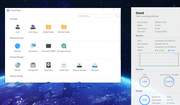

Image

I greatly appreciate any assitance...

Also another issue, I am trying to and files or entire file folder to the TNAS F2-210 and i am unable to. I am using a different PC from what I usually use, but it is another PC here in my home on the same WiFi Network and I am signed into TNAS PC on this particular PC using my same login. Do i need a different login for the individual PC in order to not have any issues?

Sorry if my questions may seem basic, but i am not nearly as PC savvy as I once was. I seemed to have lost understanding of what I thought I once knew.
User avatar
GevinKe
TM Product Manager
Posts: 251
Joined: 08 Dec 2023, 10:27
China

Re: [Help] DLNA/ Multimedia Srvs

Post by GevinKe »

ZaviausFtL wrote: 02 Oct 2025, 19:21
Hello, as your old post was published quite some time ago, the system will automatically lock it to prevent invalid replies. Currently, I have temporarily unlocked it for you, and you can continue to reply and follow up on the issue in the original post.

Regarding the issue where files or folders cannot be created, please confirm under which specific circumstance this problem occurs:
  • Is it that you cannot create them in the TOS interface?
  • Or is it that you cannot create them when accessing via SMB sharing?
At the same time, we recommend that you check whether the currently logged-in account is an administrator, and confirm that this account has the corresponding read and write permissions for the target directory.
To contact our team, please send email to following addresses, remember to replace (at) with @:

Technical team: support(at)terra-master.com(for technical support)
Service team: service(at)terra-master.com(for purchasing, return, replacement, RMA service)
User avatar
ZaviausFtL
Posts: 3
Joined: 29 Apr 2023, 01:52
United States of America

Re: [Help] DLNA/ Multimedia Srvs

Post by ZaviausFtL »

Yes, it is logged in as administrator with read and wrote permissions.

I have not tried to set up using SMB, I have used the TOS interface I guess. I guess I do not do it correctly. I would like my files to be categorize properly. I assume I thought since music has .mp3, documents have .pdf usually, and pics are .jpg, they would be categorized accordingly and then when attempting to locate vids from somewhere on my network it would be categorized and easily distinguished. Unfortunately it is not the case for me.
I need help
User avatar
TMeric
TM Product Manager
Posts: 227
Joined: 03 Jul 2023, 11:01

Re: [Help] DLNA/ Multimedia Srvs

Post by TMeric »

Do you want to upload files from your computer to the NAS and store them in three categories: Music, Documents, and Pictures?
It’s recommended to use SMB for this. Here’s how to do it: first, create three shared folders on the NAS, which are used for storing Music, Documents, and Pictures respectively; then sort the files on your computer by type and store them in the corresponding folders on the NAS. This way, you can achieve classified storage.
To contact our team, please send email to following addresses, remember to replace (at) with @:

Technical team: support(at)terra-master.com(for technical support)
Service team: service(at)terra-master.com(for purchasing, return, replacement, RMA service)
Post Reply

Return to “DLNA/Multimedia Services”