Page 1 of 1
[Help] NAS not available when busy
Posted: 30 Sep 2025, 17:51
by sukanm
I have an F5-221(NAS) and a D4-320(DAS). The DAS is connected directly to the NAS via the USB port. When I copy a large amount of files from the NAS to the DAS (for backups etc), the NAS is not available from my mac, but can be reached once the file copy has stopped.
TOS Version is 4.2.44-2203011626
I assume this is because the NAS CPUs are busy - but is this expected? Is there anything that I can do to mitigate this?
Re: [Help] NAS not available when busy
Posted: 30 Sep 2025, 19:13
by TMzethar
When NAS is performing high-speed read and write operations, the CPU, disk I/O, and network interfaces can all be in a high-load state. It is possible to cause similar phenomena.
If you wish to understand the specific load conditions, you can monitor them by entering the following commands in the terminal:
viewtopic.php?t=2350
Code: Select all
pidstat 10
pidstat -d 10
iostat 10
netstat -i
watch -n ifstat
Re: [Help] NAS not available when busy
Posted: 01 Oct 2025, 20:20
by sukanm
Is there a way to prevent this happening? The commands above seem to be only focused on monitoring what is going on.
Re: [Help] NAS not available when busy
Posted: 02 Oct 2025, 10:28
by GevinKe
Hello, we have optimized this issue, but you need to first upgrade your system to the latest version, TOS 6.0. Below are the operation instructions for the system upgrade:
viewtopic.php?t=6984
Re: [Help] NAS not available when busy
Posted: 02 Oct 2025, 15:09
by sukanm
Where can I find the BIOS level in TOS 4.2.44-2203011626 ?
Re: [Help] NAS not available when busy
Posted: 03 Oct 2025, 00:29
by GevinKe
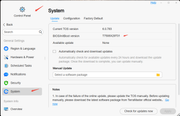
Hello, you can check the BIOS version through the following path:
ControlPanel > GeneralSettings > System
Re: [Help] NAS not available when busy
Posted: 03 Oct 2025, 17:09
by sukanm
I don't see that screen in in TOS4. How else can I see this? I want to check before I start upgrading my TOS version
Re: [Help] NAS not available when busy
Posted: 09 Oct 2025, 10:59
by GevinKe
We sincerely apologize for the oversight and for not noticing your TOS version earlier. The BIOS version display feature is indeed not available in TOS 4.
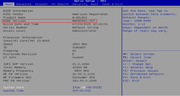
You can check the BIOS version by following these steps:
1. Connect a monitor and keyboard to your TNAS device.
2. Restart the device.
3. During the power-on self-test (POST) process, press the Del or Esc key to enter the BIOS main interface.
4. You can then view the current BIOS version information on that screen.
Re: [Help] NAS not available when busy
Posted: 10 Oct 2025, 17:26
by TMzethar
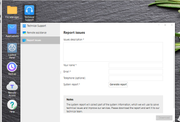
You can also collect and download the system report zip file here, extract it, and view the BIOS version from device.txt within it.
TOS Desktop > Technical Support > Report Issues
Re: [Help] NAS not available when busy
Posted: 24 Oct 2025, 14:40
by sukanm
I'm looking here to see the size of the free space on the system partition, but this item does not exist in my version of TOS - where should I find this information?
To check the free space of your system partition,
Go to "TOS > Control panel > System Info > Overview", and check free space from the item of "/" .