

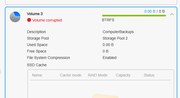
[Help] volume corrupt
[Help] volume corrupt
i am not sure when this happened, i just ran a system update on my f6-424max and a volume is um dead ?

Re: [Help] volume corrupt
You may first try the method described in the following link: viewtopic.php?t=2575
.
If the issue persists, please provide us with a screenshot of the command output for further troubleshooting.
.
If the issue persists, please provide us with a screenshot of the command output for further troubleshooting.
To contact our team, please send email to following addresses, remember to replace (at) with @:
Technical team: support(at)terra-master.com(for technical support)
Service team: service(at)terra-master.com(for purchasing, return, replacement, RMA service)
Technical team: support(at)terra-master.com(for technical support)
Service team: service(at)terra-master.com(for purchasing, return, replacement, RMA service)
Re: [Help] volume corrupt
i tried to follow the instructions but i couldnt really figure it out
clone@TERRY:/# btrfs check /dev/mapper/vg1-lv3
Opening filesystem to check...
ERROR: /dev/mapper/vg1-lv3 is currently mounted, use --force if you really intend to check the filesystem
clone@TERRY:/# btrfs check /dev/mapper/vg1-lv2
Opening filesystem to check...
Checking filesystem on /dev/mapper/vg1-lv2
UUID: cfe6ee30-5987-40fe-b47f-5ebb001ac1fd
[1/7] checking root items
[2/7] checking extents
[3/7] checking free space tree
[4/7] checking fs roots
[5/7] checking only csums items (without verifying data)
[6/7] checking root refs
[7/7] checking quota groups skipped (not enabled on this FS)
found 6588441346048 bytes used, no error found
total csum bytes: 6425656240
total tree bytes: 8569356288
total fs tree bytes: 612892672
total extent tree bytes: 605552640
btree space waste bytes: 891865058
file data blocks allocated: 7223584948224
referenced 7419690835968
clone@TERRY:/# btrfs check /dev/mapper/vg1-lv3
Opening filesystem to check...
ERROR: /dev/mapper/vg1-lv3 is currently mounted, use --force if you really intend to check the filesystem
clone@TERRY:/# btrfs check /dev/mapper/vg1-lv2
Opening filesystem to check...
Checking filesystem on /dev/mapper/vg1-lv2
UUID: cfe6ee30-5987-40fe-b47f-5ebb001ac1fd
[1/7] checking root items
[2/7] checking extents
[3/7] checking free space tree
[4/7] checking fs roots
[5/7] checking only csums items (without verifying data)
[6/7] checking root refs
[7/7] checking quota groups skipped (not enabled on this FS)
found 6588441346048 bytes used, no error found
total csum bytes: 6425656240
total tree bytes: 8569356288
total fs tree bytes: 612892672
total extent tree bytes: 605552640
btree space waste bytes: 891865058
file data blocks allocated: 7223584948224
referenced 7419690835968

Re: [Help] volume corrupt
After executing the final instruction /etc/tos/scripts/mntdata in the operation guide, does the volume still show as 'damaged'?
If it is still "damaged", please collect the system report zip in the Technical Support-Issues Report collection system, and then send it to our official website Live Chat or support email.
If it is still "damaged", please collect the system report zip in the Technical Support-Issues Report collection system, and then send it to our official website Live Chat or support email.
To contact our team, please send email to following addresses, remember to replace (at) with @:
Technical team: support(at)terra-master.com (for technical support)
Service team: service(at)terra-master.com (for purchasing, return, replacement, RMA service)
Technical team: support(at)terra-master.com (for technical support)
Service team: service(at)terra-master.com (for purchasing, return, replacement, RMA service)
Re: [Help] volume corrupt
drive still corrupt
log download tool not working
Hmmm… can't reach this page
It looks like the webpage at http://xxxx.local:8181/v2/assistent/dow ... 250831.zip might be having issues, or it may have moved permanently to a new web address.
ERR_INVALID_RESPONSE
i really dont understand those instructions that where provided
log download tool not working
Hmmm… can't reach this page
It looks like the webpage at http://xxxx.local:8181/v2/assistent/dow ... 250831.zip might be having issues, or it may have moved permanently to a new web address.
ERR_INVALID_RESPONSE
i really dont understand those instructions that where provided
Re: [Help] volume corrupt
You provided a local network link, which cannot be accessed.
Regarding your issue, it is recommended that you schedule an engineer for remote troubleshooting via Live Chat.
Regarding your issue, it is recommended that you schedule an engineer for remote troubleshooting via Live Chat.
To contact our team, please send email to following addresses, remember to replace (at) with @:
Technical team: support(at)terra-master.com (for technical support)
Service team: service(at)terra-master.com (for purchasing, return, replacement, RMA service)
Technical team: support(at)terra-master.com (for technical support)
Service team: service(at)terra-master.com (for purchasing, return, replacement, RMA service)