[Help] Need help removing a "RAIDed" Drive from TNAS Server

RAID, Volume, storage pool, hard drive, USB, SSD cache and iSCSI LUN
Post Reply
User avatar
Noobie2323
Posts: 13
Joined: 29 Aug 2023, 10:08

[Help] Need help removing a "RAIDed" Drive from TNAS Server

Post by Noobie2323 »

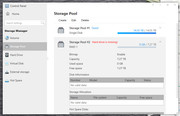
I'm hoping this is an easy question. I have Terramaster Server F2-221 running TOS 4.20.40-. I have a single 12TB drive that is hosting my media files in Bay 1. I bought another 12TB drive that I want to "add" to the server for a total of 24TB of storage. I do not want to set it up as a RAID pair. Previously, I bought two 8TB drives that I mistakenly tried to set up as a RAID. I'm not the most saavy so when that didn't work, I just took out the 8TB drives and popped my original 12TB drive back in. I'm starting to starting to run out of storage on the original 12TB and need to figure out a solution. I have removed the "RAIDed" drive as a volume, but I cannot remove it from the storage pool. I click delete and it pops back up. Can anyone give me some advice on how to "remove" the RAIDed drive from the server and how to add the a 2nd 12TB drive to the server so that there is 24TB of storage?

I really appreciate any help that people can provide!
Image
User avatar
TMnight
TM Support
Posts: 126
Joined: 30 Sep 2022, 16:40

Re: [Help] Need help removing a "RAIDed" Drive from TNAS Server

Post by TMnight »

Noobie2323 wrote: 23 Jul 2025, 08:24
There are some differences between your description and the screenshot:

1. Hard disk No. 1 should have a capacity of 16T.

2. Your device model is F2-221, which can only accommodate two hard disks. For example, the current hard disk No. 1 and the newly added 12T hard disk. However, since the array mode of hard disk No. 1 is Single Disk, the new hard disk cannot be added directly. To achieve a total capacity of 24T, you need to configure the two hard disks as RAID0 or JBOD. To do this, you need to delete storage pool 1 and storage pool 2, and then recreate a new storage pool with an array mode of RAID0 or JBOD. This will give you a storage capacity of 24T or more, but please note that these two array modes do not provide data redundancy, so you need to pay special attention to data security.

For problems when deleting storage pools, it is recommended to restart the NAS first and disable all applications and services (such as SMB). Next, try to delete the volume first and then the storage pool in order. But before performing the deletion operation, be sure to back up all data, because deleting the storage pool and volume will clear all the data in them.

If the deletion still fails, you can try to shut down the NAS directly, unplug the hard drive used to create storage pool 2 (such as the 8TB hard drive shown in the figure). Then restart the NAS. After entering the TOS system, directly insert the new 12TB hard drive and create a new storage pool.
To contact our team, please send email to following addresses, remember to replace (at) with @:
Technical team: support(at)terra-master.com(for technical support)
Service team: service(at)terra-master.com(for purchasing, return, replacement, RMA service)
User avatar
Noobie2323
Posts: 13
Joined: 29 Aug 2023, 10:08

Re: [Help] Need help removing a "RAIDed" Drive from TNAS Server

Post by Noobie2323 »

Hi, thanks so much for responding. I checked and you're right. The original had 16TB, so I'm shooting for 28TB, I guess. Redundancy is not a concern. If I delete storage pool #1, that will delete all the data stored on that drive, correct? I primarily use the NAS for Plex, a media server application. It works by adding folders to certain libraries set up on the application. I currently have a folder for movies and a folder for 4K movies on that drive that both populate in the application when I buy a new movie and add the file. Is it potentially easier to have two separate storage pools (one with 16TB and one with 12TB) or is that even possible? Theoretically, I'm thinking I could create distinct folders on each drive that both "feed" into the libraries on the Plex server? So a "movie" folder and a "4K movie" folder on the 16TB and a "movie" folder and a "4K movie" folder on the 12TB that I start using when the space on the original drive is used up.
User avatar
TMnight
TM Support
Posts: 126
Joined: 30 Sep 2022, 16:40

Re: [Help] Need help removing a "RAIDed" Drive from TNAS Server

Post by TMnight »

Yes, if you delete storage pool 1, all data in the hard disk will be deleted. Here are two solutions for you:
1. If you don't have a lot of data, or it's convenient to back up, you can try to back up and then delete storage pool 1, and then recreate a 28T storage pool with 16T and 12T
2. Do not delete storage pool 1, create a storage pool 2 and volume 2 with a 12T hard disk. Then create a shared folder belonging to volume 2 to store data
You can choose a method according to your situation.
To contact our team, please send email to following addresses, remember to replace (at) with @:
Technical team: support(at)terra-master.com(for technical support)
Service team: service(at)terra-master.com(for purchasing, return, replacement, RMA service)
User avatar
Noobie2323
Posts: 13
Joined: 29 Aug 2023, 10:08

Re: [Help] Need help removing a "RAIDed" Drive from TNAS Server

Post by Noobie2323 »

TMnight wrote: 23 Jul 2025, 11:33 Yes, if you delete storage pool 1, all data in the hard disk will be deleted. Here are two solutions for you:
1. If you don't have a lot of data, or it's convenient to back up, you can try to back up and then delete storage pool 1, and then recreate a 28T storage pool with 16T and 12T
2. Do not delete storage pool 1, create a storage pool 2 and volume 2 with a 12T hard disk. Then create a shared folder belonging to volume 2 to store data
You can choose a method according to your situation.
I would MUCH prefer option 2. Can you provide some guidance on how I can "remove" the current storage pool 2? Each time I delete it, it repopulates after a few seconds. Currently, I only have one Volume, but I can't seem to delete the second storage pool in order to properly format the new 12TB drive.
User avatar
TMnight
TM Support
Posts: 126
Joined: 30 Sep 2022, 16:40

Re: [Help] Need help removing a "RAIDed" Drive from TNAS Server

Post by TMnight »

Before deleting volumes and storage pools, restart the NAS and disable all applications and services (such as SMB). Then try to delete the volumes first and then the storage pool. But be sure to back up all data before performing the deletion operation.
To contact our team, please send email to following addresses, remember to replace (at) with @:
Technical team: support(at)terra-master.com(for technical support)
Service team: service(at)terra-master.com(for purchasing, return, replacement, RMA service)
User avatar
Noobie2323
Posts: 13
Joined: 29 Aug 2023, 10:08

Re: [Help] Need help removing a "RAIDed" Drive from TNAS Server

Post by Noobie2323 »

Okay. Thanks! I'll give a try tonight.
User avatar
Noobie2323
Posts: 13
Joined: 29 Aug 2023, 10:08

Re: [Help] Need help removing a "RAIDed" Drive from TNAS Server

Post by Noobie2323 »

TMnight wrote: 23 Jul 2025, 16:08 Before deleting volumes and storage pools, restart the NAS and disable all applications and services (such as SMB). Then try to delete the volumes first and then the storage pool. But be sure to back up all data before performing the deletion operation.
This worked. I've loaded the second 12TB drive as its own volume. Thank you so much for your help.
Post Reply

Return to “Storage”