[Help] How do I trim SSD?


Re: [Help] How do I trim SSD?
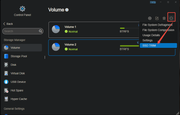
I apologize for the delayed response to your question. After confirming that the SSD TRIM feature is available, I am here to inform you about its usage method. We indeed have this feature, and it can be used as follows: Go to Control Panel > Storage Management > Volume More Functions, scroll down to the last item, select 'SSD TRIM', set the schedule and time for enabling the SSD TRIM task in the pop-up window, and then enable it.
To contact our team, please send email to following addresses. "(at)" = "@"
Technical team: support(at)terra-master.com
Service team: service(at)terra-master.com
Technical team: support(at)terra-master.com
Service team: service(at)terra-master.com


Re: [Help] How do I trim SSD?
You really should:
TRIM is a command that allows an operating system to inform a Solid State Drive (SSD) which data blocks are no longer in use, enabling the SSD to erase them internally. This process helps optimize SSD performance and lifespan by allowing the drive to manage its free space more effectively. TRIM works in conjunction with garbage collection, a process that consolidates valid data into fewer blocks, freeing up more space.
F5-221 TOS7.0.1278 - 4x4TB (Ironwolf) Traid
F2-424 TOS7.0.1278 - 2x500GB nvme (P3) Traid, 2x6TB HDD (HGST) Traid
F2-221 TOS7.0.1278 - 1x3TB Ext4, 1x4TB Btrfs
F2-425+ TOS7.0.1278 - 2x500GB nvme (P3) Traid, 2x6TB HDD (EXOS) Traid
F2-424 TOS7.0.1278 - 2x500GB nvme (P3) Traid, 2x6TB HDD (HGST) Traid
F2-221 TOS7.0.1278 - 1x3TB Ext4, 1x4TB Btrfs
F2-425+ TOS7.0.1278 - 2x500GB nvme (P3) Traid, 2x6TB HDD (EXOS) Traid
Re: [Help] How do I trim SSD?
Go to Control Panel > Volume
Select a volume (click to highlight) > Other (3 dots) > SSD Trim
{I might agree; it's odd to be under a specific volume which might be one of several, and does not seem to worry about the operating system...... Oh Well!}
and, just for @SWADED
FYI no on either count! And, I'll even consider helping someone who might not appreciate it.Are you working for Terramaster or are you just a fanboy?

F5-221 TOS7.0.1278 - 4x4TB (Ironwolf) Traid
F2-424 TOS7.0.1278 - 2x500GB nvme (P3) Traid, 2x6TB HDD (HGST) Traid
F2-221 TOS7.0.1278 - 1x3TB Ext4, 1x4TB Btrfs
F2-425+ TOS7.0.1278 - 2x500GB nvme (P3) Traid, 2x6TB HDD (EXOS) Traid
F2-424 TOS7.0.1278 - 2x500GB nvme (P3) Traid, 2x6TB HDD (HGST) Traid
F2-221 TOS7.0.1278 - 1x3TB Ext4, 1x4TB Btrfs
F2-425+ TOS7.0.1278 - 2x500GB nvme (P3) Traid, 2x6TB HDD (EXOS) Traid
Re: [Help] How do I trim SSD?
A trim command (known as TRIM in the ATA command set, and UNMAP in the SCSI command set) allows an operating system to inform a solid-state drive (SSD) which blocks of data are no longer considered to be "in use" and therefore can be erased internally.[1]
Trim was introduced soon after SSDs were introduced. Because low-level operation of SSDs differs significantly from hard drives, the conventional manner in which operating systems handle storage operations—such as deletions and formatting—resulted in unanticipated progressive performance degradation of write operations on SSDs.[2] Trimming enables the SSD to more efficiently handle garbage collection, which would otherwise slow future write operations to the involved blocks.[3]
Although tools to "reset" some drives to a fresh state were already available before the introduction of trimming, they also delete all data on the drive, which makes them impractical to use for ongoing optimization.[4] As of 2010, many SSDs had internal garbage collection mechanisms for certain filesystem(s) (such as FAT32, NTFS, APFS) that worked independently of trimming. Although this successfully maintained their lifetime and performance even under operating systems that did not support trim, it had the associated drawbacks of increased write amplification and wear of the flash cells.[5]
TRIM is also used on some shingled magnetic recording (SMR) hard drives.[6]
Background
Because of the way that many file systems handle delete operations, by flagging data blocks as "not in use",[7][8] storage media (SSDs, but also traditional hard drives) generally do not know which sectors/pages are truly in use and which can be considered free space. Contrary to (for example) an overwrite operation, a delete will not involve a physical write to the sectors that contain the data. Since a common SSD has no knowledge of the file system structures, including the list of unused blocks/sectors, the storage medium remains unaware that the blocks have become available. While this often enables undelete tools to recover files from electromechanical hard disks,[8][9] despite the files being reported as "deleted" by the operating system, it also means that when the operating system later performs a write operation to one of the sectors, which it considers free space, it effectively becomes an overwrite operation from the point of view of the storage medium. For magnetic disks, an overwrite of existing data is no different from writing into an empty sector, but because of how some SSDs function at the lowest level, an overwrite produces significant overhead compared with writing data into an empty page, potentially crippling write performance.[8][10]
SSDs store data in flash memory cells that are grouped into pages typically of 4 to 16 kiB, grouped together into blocks of typically 128 to 512 pages. Example: 512 kiB blocks that group 128 pages of 4 kiB each.[7][11] NAND flash memory cells can be directly written to only when they are empty. If they happen to contain data, the contents must be erased before a write operation. An SSD write operation can be done to a single page but, due to hardware limitations, erase commands always affect entire blocks;[11] consequently, writing data to empty pages on an SSD is very fast, but slows down considerably once previously written pages need to be overwritten. Since an erase of the cells in the page is needed before it can be written to again, but only entire blocks can be erased, an overwrite will initiate a read-erase-modify-write cycle:[7][12] the contents of the entire block are stored in cache, then the entire block is erased from the SSD, then the overwritten page(s) is written into the cached block, and only then can the entire updated block be written to the flash medium. This phenomenon is known as write amplification.[13][14]
Operation
The TRIM command enables an operating system to notify the SSD of pages which no longer contain valid data. For a file deletion operation, the operating system will mark the file's sectors as free for new data, then send a TRIM command to the SSD. After trimming, the SSD will not preserve any contents of the block when writing new data to a page of flash memory, resulting in less write amplification (fewer writes), higher write throughput (no need for a read-erase-modify sequence), thus increasing drive life.
Different SSDs implement the command somewhat differently, so performance can vary.[3][9]
TRIM tells the SSD to mark an LBA region as invalid and subsequent reads on the region will not return any meaningful data. For a very brief time, the data could still reside on the flash internally. However, after the TRIM command is issued and garbage collection has taken place, data recovery can become difficult or impossible, depending on the drive's firmware implementation of the command.[15]
https://en.wikipedia.org/wiki/Trim_(computing)
F4-424 Pro, TOS 6.0.694
Re: [Help] How do I trim SSD?
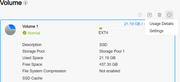
I don't have this option, only ''Usage Details'' and ''Settings". Does the SSD need to be a specific filesystem?OrionXie wrote: ↑08 Jul 2025, 21:56I apologize for the delayed response to your question. After confirming that the SSD TRIM feature is available, I am here to inform you about its usage method. We indeed have this feature, and it can be used as follows: Go to Control Panel > Storage Management > Volume More Functions, scroll down to the last item, select 'SSD TRIM', set the schedule and time for enabling the SSD TRIM task in the pop-up window, and then enable it.
F4-424 Pro, TOS 6.0.694

Re: [Help] How do I trim SSD?
Sorry this function is only for SSD, you are using HDD, so it is not available for you.
To contact our team, please send email to following addresses, remember to replace (at) with @
Technical team: support(at)terra-master.com(for technical support)
Service team: service(at)terra-master.com(for purchasing, return, replacement, RMA service)
Technical team: support(at)terra-master.com(for technical support)
Service team: service(at)terra-master.com(for purchasing, return, replacement, RMA service)
Re: [Help] How do I trim SSD?
Just because the description says "SSD" means nothing Description is anything the admin chooses when setting up.
Could be "Fred's Karno Army" if you wish. Does not make it an SSD or an army.
Did you physically install a 2.5" SATA SSD in an HDD caddy??
Could be "Fred's Karno Army" if you wish. Does not make it an SSD or an army.
Did you physically install a 2.5" SATA SSD in an HDD caddy??
F5-221 TOS7.0.1278 - 4x4TB (Ironwolf) Traid
F2-424 TOS7.0.1278 - 2x500GB nvme (P3) Traid, 2x6TB HDD (HGST) Traid
F2-221 TOS7.0.1278 - 1x3TB Ext4, 1x4TB Btrfs
F2-425+ TOS7.0.1278 - 2x500GB nvme (P3) Traid, 2x6TB HDD (EXOS) Traid
F2-424 TOS7.0.1278 - 2x500GB nvme (P3) Traid, 2x6TB HDD (HGST) Traid
F2-221 TOS7.0.1278 - 1x3TB Ext4, 1x4TB Btrfs
F2-425+ TOS7.0.1278 - 2x500GB nvme (P3) Traid, 2x6TB HDD (EXOS) Traid