[Help] [TOS 6] SSH Key Authentication Fails Due to Home Directory Permissions?
Posted: 25 Jun 2025, 00:40
Hi everyone,
I'm currently using a TNAS running TOS 6 and ran into an issue when trying to connect via SSH using an RSA key.
Details:
The same SSH key works fine on other systems (VPS, Synology, etc.).
On TerraMaster, the connection fails with:
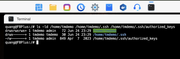
After manually running:
→ SSH key login works as expected.
I'm wondering:
- Is this the default behavior in TOS 6 when creating new (admin) users?
- Is there an official way to use SSH key authentication without manually changing permissions?
Would appreciate any insights or suggestions from the team and community.
Thanks in advance!
I'm currently using a TNAS running TOS 6 and ran into an issue when trying to connect via SSH using an RSA key.
Details:
The same SSH key works fine on other systems (VPS, Synology, etc.).
On TerraMaster, the connection fails with:
I noticed that the user home directory is created with 777 permissions and includes ACL (indicated by a +).Authentication refused: bad ownership or modes for directory /home/username
After manually running:
Code: Select all
chmod 755 /home/username I'm wondering:
- Is this the default behavior in TOS 6 when creating new (admin) users?
- Is there an official way to use SSH key authentication without manually changing permissions?
Would appreciate any insights or suggestions from the team and community.
Thanks in advance!