[Help] [TOS 6] SSH Key Authentication Fails Due to Home Directory Permissions?

IPv4/6, Port, VPN, proxy, SSH, remote access and more.
Post Reply
User avatar
gustang
Posts: 9
Joined: 22 Mar 2023, 10:55

[Help] [TOS 6] SSH Key Authentication Fails Due to Home Directory Permissions?

Post by gustang »

Hi everyone,
I'm currently using a TNAS running TOS 6 and ran into an issue when trying to connect via SSH using an RSA key.

Details:

The same SSH key works fine on other systems (VPS, Synology, etc.).

On TerraMaster, the connection fails with:
Authentication refused: bad ownership or modes for directory /home/username
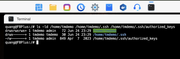
I noticed that the user home directory is created with 777 permissions and includes ACL (indicated by a +).

Image

After manually running:

Code: Select all

chmod 755 /home/username 
→ SSH key login works as expected.

I'm wondering:

- Is this the default behavior in TOS 6 when creating new (admin) users?

- Is there an official way to use SSH key authentication without manually changing permissions?

Would appreciate any insights or suggestions from the team and community.
Thanks in advance!
User avatar
MikeZhang
TM Support
Posts: 381
Joined: 05 Sep 2023, 22:21

Re: [Help] [TOS 6] SSH Key Authentication Fails Due to Home Directory Permissions?

Post by MikeZhang »

1. The user created when reinstalling the system is a root user by default. Subsequent users need to be manually granted administrator privileges in the TOS system. The default privileges are ordinary user privileges.
2. No
To contact our team, please send email to following addresses, remember to replace (at) with @

Technical team: support(at)terra-master.com(for technical support)
Service team: service(at)terra-master.com(for purchasing, return, replacement, RMA service)
Post Reply

Return to “Network”