[Help] F4-210 will not expand volume
Posted: 18 Jun 2025, 08:36
Hello,
I'm helping my friend add more space to his NAS which I initially set up for him.
It is a F4-210 on version 4.2.40-2203011629 (4.2.44 seems available but no release notes since 4.2.41?)
Initially he was running RAID5 with 4x 6TB drives. He wanted to add a lot of capacity, so we went to the recommended Seagate 20TB drives. One of which was DOA and the replacement Seagate sent ended up being 24TB. But all 4 drives are detected and working fine, and synchronization is complete.
Now that that is all done, I am trying to expand the volume. This appears to be possible.
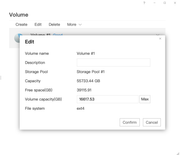
Here we can see there is available capacity.
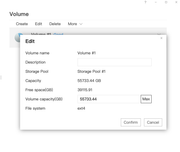
Here I have clicked on the "Max" button to fill the volume.
After this, I click confirm. I see the spinning progress indicator for a moment as if it's doing it, it finishes, and then nothing.
Everything stays the same and the volume does not expand. I've tried it 3 times now and no luck. Not sure what to try next.
We are really hoping to be able to do this in place and not need to recreate the volume/redo his Plex Server.
I'm helping my friend add more space to his NAS which I initially set up for him.
It is a F4-210 on version 4.2.40-2203011629 (4.2.44 seems available but no release notes since 4.2.41?)
Initially he was running RAID5 with 4x 6TB drives. He wanted to add a lot of capacity, so we went to the recommended Seagate 20TB drives. One of which was DOA and the replacement Seagate sent ended up being 24TB. But all 4 drives are detected and working fine, and synchronization is complete.
Now that that is all done, I am trying to expand the volume. This appears to be possible.
Here we can see there is available capacity.
Here I have clicked on the "Max" button to fill the volume.
After this, I click confirm. I see the spinning progress indicator for a moment as if it's doing it, it finishes, and then nothing.
Everything stays the same and the volume does not expand. I've tried it 3 times now and no luck. Not sure what to try next.
We are really hoping to be able to do this in place and not need to recreate the volume/redo his Plex Server.