[Help] F4-210 will not expand volume

RAID, Volume, storage pool, hard drive, USB, SSD cache and iSCSI LUN
Post Reply
User avatar
atirrell
Posts: 3
Joined: 18 Jun 2025, 08:27
United States of America

[Help] F4-210 will not expand volume

Post by atirrell »

Hello,

I'm helping my friend add more space to his NAS which I initially set up for him.
It is a F4-210 on version 4.2.40-2203011629 (4.2.44 seems available but no release notes since 4.2.41?)

Initially he was running RAID5 with 4x 6TB drives. He wanted to add a lot of capacity, so we went to the recommended Seagate 20TB drives. One of which was DOA and the replacement Seagate sent ended up being 24TB. But all 4 drives are detected and working fine, and synchronization is complete.

Now that that is all done, I am trying to expand the volume. This appears to be possible.
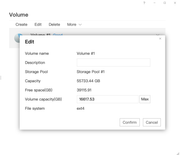
Image
Here we can see there is available capacity.
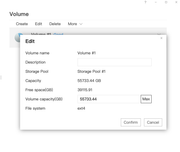
Image
Here I have clicked on the "Max" button to fill the volume.

After this, I click confirm. I see the spinning progress indicator for a moment as if it's doing it, it finishes, and then nothing.
Everything stays the same and the volume does not expand. I've tried it 3 times now and no luck. Not sure what to try next.
We are really hoping to be able to do this in place and not need to recreate the volume/redo his Plex Server.
User avatar
TMzethar
TM Support
Posts: 2819
Joined: 27 Oct 2020, 16:43

Re: [Help] F4-210 will not expand volume

Post by TMzethar »

The volume might be occupied by some service or application, preventing it from being temporarily uninstalled to increase capacity.
Please refer to this guide to release the occupation:
viewtopic.php?t=5955
After releasing the occupation, try expanding the volume again.
To contact our team, please send email to following addresses, remember to replace (at) with @:
Technical team: support(at)terra-master.com (for technical support)
Service team: service(at)terra-master.com (for purchasing, return, replacement, RMA service)
User avatar
atirrell
Posts: 3
Joined: 18 Jun 2025, 08:27
United States of America

Re: [Help] F4-210 will not expand volume

Post by atirrell »

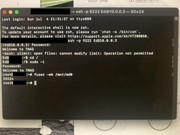
I followed the instructions to a T.
Shut off all services that you can in the web interface.
Ran the terminal command.
The only response from that was "22524" -- whatever that means.
Image

After this I tried expanding the volume in the web interface and still no change. It doesn't even tell you "Yes I did it" "No I can't do this" -- just a spinning progress ball and no change.
User avatar
MikeZhang
TM Support
Posts: 381
Joined: 05 Sep 2023, 22:21

Re: [Help] F4-210 will not expand volume

Post by MikeZhang »

atirrell wrote: 10 Jul 2025, 00:49
Can you restart NAS try again?
To contact our team, please send email to following addresses, remember to replace (at) with @

Technical team: support(at)terra-master.com(for technical support)
Service team: service(at)terra-master.com(for purchasing, return, replacement, RMA service)
User avatar
CursaYang
TM Support
Posts: 740
Joined: 06 Jan 2025, 16:34
China

Re: [Help] F4-210 will not expand volume

Post by CursaYang »

You can use the command 'ps -ef | grep 22542' to see what process or service with process ID 22542 is running and occupying the volume.
To contact our team, please send email to following addresses, remember to replace (at) with @

Technical team: support(at)terra-master.com(for technical support)
Service team: service(at)terra-master.com(for purchasing, return, replacement, RMA service)
Post Reply

Return to “Storage”