Page 1 of 1
[Help] LDAP Client Setup
Posted: 09 Jun 2025, 23:45
by pongo
Hello,
I am trying to setup ldap client based on
https://github.com/lldap/lldap running inside TOS 6.0 docker on F4-423
But getting check dns records network blocked?
Any idea to fix this?
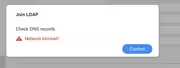
Re: [Help] LDAP Client Setup
Posted: 10 Jun 2025, 07:36
by MikeZhang
pongo wrote: ↑09 Jun 2025, 23:45
Hi, would you like to change DNS to 8.8.8.8 then try again?
Re: [Help] LDAP Client Setup
Posted: 20 Jun 2025, 14:32
by eavn
pongo wrote: ↑09 Jun 2025, 23:45
Hello,
I am trying to setup ldap client based on
https://github.com/lldap/lldap running inside TOS 6.0 docker on F4-423
But getting check dns records network blocked?
Any idea to fix this?
I use Synology LDAP Server instead of LLDAP. However, it appears that the LDAP Client on TM does not support LDAPS. When I enable the "Require secure/encrypted connection" option on the LDAP Server, TM reports a "Network Blocked" error. Removing this option allows the connection to succeed.
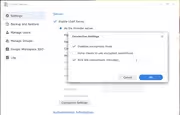
Hope this helps.
Re: [Help] LDAP Client Setup
Posted: 20 Jun 2025, 18:33
by TMzethar
eavn wrote: ↑20 Jun 2025, 14:32
Please tell us your NAS model and TOS version. We will verify it.
Re: [Help] LDAP Client Setup
Posted: 20 Jun 2025, 19:26
by gustang
Thank you @TMzethar.
We test with various TNAS (F4-424/F4-424 Pro/F8-SSD Plus and now T9-500 Pro) and all TOS6 from beginning, now lastest TOS6 updated
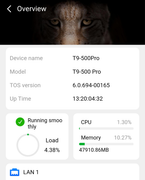
We also tests and ruled out certain cases. When enabling the "force clients to use Encrypted connections" option, the applications we use (Snipe-IT, Portainer, pGina, etc.) can still connect normally to the Synology LDAP Server via LDAPS:// (port 636). However, TNAS cannot connect (Network Blocked error) unless we disable the "force clients to use encrypted connections" option.