Why does my browser show 'Connection not secure' for NAS IP address?
Posted: 09 Jun 2025, 12:11
Applicable Versions: All TOS versions
Applicable Models: All TerraMaster NAS devices
Symptom:
When accessing the TerraMaster TOS WEB GUI via a browser (e.g., Chrome, Edge), you may see warnings such as "Not Secure" or "Your connection is not private".

Root Cause:
This occurs because:The NAS uses a local IP address (e.g., http://192.168.1.100) without an official HTTPS certificate configured by default.
Modern browsers enforce strict security policies and flag all unencrypted HTTP connections as "insecure”, even within a local network.
This is a common behavior across NAS brands, as most devices ship without forced HTTPS for local access.
Solutions:
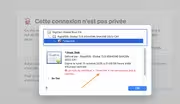
1.Temporarily bypass the warning (for local access only): Click "Advanced" > "Continue to [IP address]" (exact wording varies by browser).
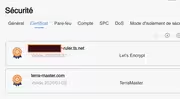
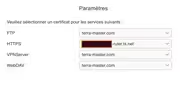
2.Bind a domain (e.g., via DDNS or TNAS.online) and configure an HTTPS certificate.
Note:
TerraMaster will continue optimizing TOS to enhance security and stability. For further assistance, contact our official support team or visit the community forum.
Applicable Models: All TerraMaster NAS devices
Symptom:
When accessing the TerraMaster TOS WEB GUI via a browser (e.g., Chrome, Edge), you may see warnings such as "Not Secure" or "Your connection is not private".
Root Cause:
This occurs because:The NAS uses a local IP address (e.g., http://192.168.1.100) without an official HTTPS certificate configured by default.
Modern browsers enforce strict security policies and flag all unencrypted HTTP connections as "insecure”, even within a local network.
This is a common behavior across NAS brands, as most devices ship without forced HTTPS for local access.
Solutions:
1.Temporarily bypass the warning (for local access only): Click "Advanced" > "Continue to [IP address]" (exact wording varies by browser).
2.Bind a domain (e.g., via DDNS or TNAS.online) and configure an HTTPS certificate.
Note:
TerraMaster will continue optimizing TOS to enhance security and stability. For further assistance, contact our official support team or visit the community forum.