Why does my browser show 'Connection not secure' for NAS IP address?

Network connection, configuration, remote access
Post Reply
User avatar
TMnight
TM Support
Posts: 181
Joined: 30 Sep 2022, 16:40

Why does my browser show 'Connection not secure' for NAS IP address?

Post by TMnight »

Applicable Versions: All TOS versions
Applicable Models: All TerraMaster NAS devices

Symptom:
When accessing the TerraMaster TOS WEB GUI via a browser (e.g., Chrome, Edge), you may see warnings such as "Not Secure" or "Your connection is not private".
Image

Root Cause:
This occurs because:The NAS uses a local IP address (e.g., http://192.168.1.100) without an official HTTPS certificate configured by default.
Modern browsers enforce strict security policies and flag all unencrypted HTTP connections as "insecure”, even within a local network.
This is a common behavior across NAS brands, as most devices ship without forced HTTPS for local access.

Solutions:
1.Temporarily bypass the warning (for local access only): Click "Advanced" > "Continue to [IP address]" (exact wording varies by browser).
2.Bind a domain (e.g., via DDNS or TNAS.online) and configure an HTTPS certificate.

Note:
TerraMaster will continue optimizing TOS to enhance security and stability. For further assistance, contact our official support team or visit the community forum.

To contact our team, please send email to following addresses, remember to replace (at) with @:
Technical team: support(at)terra-master.com(for technical support)
Service team: service(at)terra-master.com(for purchasing, return, replacement, RMA service)
User avatar
ijurisic
Posts: 6
Joined: 28 Apr 2025, 15:15
Croatia

Re: Why does my browser show 'Connection not secure' for NAS IP address?

Post by ijurisic »

Great post, thanks for share
F6-424 MAX TOS6.0.750 - 4x4TB SSD (User data), 2x4TB NVME (iSCSI data), 2x8TB HDD (Surveillance)
User avatar
FredMutter
Posts: 89
Joined: 17 Jan 2025, 20:11
France

Re: Why does my browser show 'Connection not secure' for NAS IP address?

Post by FredMutter »

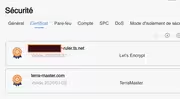
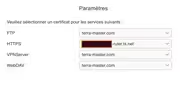
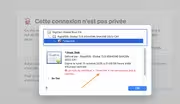
As shown in my screenshots, I’m using a Tailscale certificate, which is correctly associated with the HTTPS port. However, the browser still displays a warning showing a *.tnas.link certificate — which is no longer in use.
I’m certain the Tailscale certificate is applied correctly, so where is this tnas.link certificate coming from?

I’m accessing my home server using the DNS name provided by Tailscale: ***-ruler.ts.net/tos/#/.

Image

Image


Image
Model: F2-424 with TOS 7.0.0777 Bios V08
you can discuss with me in French, German and English
Post Reply

Return to “Networking”