

Last year i bought a F4-210 with 1x8TB drive and created a single volume pool. As the mentioned drive reached capacity, i bought another disk (same capacity and same manufacturer) to be added as a RAID 0/JBOD config (in this case I need to maximize the storage space).
With my suprise i noticed that adding a disk to the existing volume automatically converts it to a RAID1 setup which I don't want.
So i've created a new pool (#2), with the new disk, however the UI was not letting me add a new volume (option was grayed out). So i've deleted the new pool (#2) but the UI was glitching (pool disappears, and then reappers, then disappers again ,etc), so i tought that a reboot could help.
The reboot completed, I'm now presented with the initial wizard (the one you do when you first start it) and the only option it gives me is to delete the whole data.
I was very disappointed in the overall re-size process, and by the overall lack of functionalities (iscsi target app it's a joke) but i was not expecting that i would eventually loose all the data.
I haven't completed the wizard yet, hoping that someone might help here.
Any input is appreciated before i toss this thing out of the window
[Help] F4-210 add a new disk resulted in initial wizard
Re: [Help] F4-210 add a new disk resulted in initial wizard
update, i've removed the new disk, then it boots up normally.
i've reinserted the disk again , create a new pool, UI says it worked but still i cannot create a new volume; after a bit, this is what i'm presented with: vg creation failed on the new disk, the original pool presented twice (??)
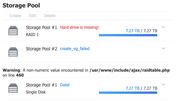
i've reinserted the disk again , create a new pool, UI says it worked but still i cannot create a new volume; after a bit, this is what i'm presented with: vg creation failed on the new disk, the original pool presented twice (??)

Re: [Help] F4-210 add a new disk resulted in initial wizard
On F4-210, besides RAID1, which can be migrated from Single, you need to create other types of RAID from scratch.
The anomaly you mentioned is likely related to disk failure or system issues. We recommend contacting the support email or Official Live Chat to gather a system report for them to analyze (TOS Desktop > Technical Support > Report Issues).
The anomaly you mentioned is likely related to disk failure or system issues. We recommend contacting the support email or Official Live Chat to gather a system report for them to analyze (TOS Desktop > Technical Support > Report Issues).
To contact our team, please send email to following addresses, remember to replace (at) with @:
Technical team: support(at)terra-master.com (for technical support)
Service team: service(at)terra-master.com (for purchasing, return, replacement, RMA service)
Technical team: support(at)terra-master.com (for technical support)
Service team: service(at)terra-master.com (for purchasing, return, replacement, RMA service)