Page 1 of 1
[Help] F4-424 Backup Image File System Snapshot
Posted: 10 May 2025, 08:15
by jemlinus
Hi,
I'm having trouble reclaiming space on my NAS. I had previously enabled File System Snapshots, but I’ve since deleted the backups and switched to using USB backups.
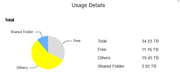
However, I'm seeing a discrepancy: the total size of the files currently stored on the NAS is around 12TB, but the system reports that I'm using approximately 23TB. I checked the File System Snapshots section, and there doesn't appear to be anything left there.
Is there a way to check for any hidden or unnecessary files still occupying space on the system?
Any help would be greatly appreciated.
Best regards,
Re: [Help] F4-424 Backup Image File System Snapshot
Posted: 10 May 2025, 14:31
by GevinKe
jemlinus wrote: ↑10 May 2025, 08:15
Hi,
I'm having trouble reclaiming space on my NAS. I had previously enabled File System Snapshots, but I’ve since deleted the backups and switched to using USB backups.
However, I'm seeing a discrepancy: the total size of the files currently stored on the NAS is around 12TB, but the system reports that I'm using approximately 23TB. I checked the File System Snapshots section, and there doesn't appear to be anything left there.
Is there a way to check for any hidden or unnecessary files still occupying space on the system?
Any help would be greatly appreciated.
Best regards,
You may refer to the following guide for troubleshooting:
viewtopic.php?t=6999
We hope these steps will help you resolve the current issue smoothly.
Re: [Help] F4-424 Backup Image File System Snapshot
Posted: 12 May 2025, 05:25
by jemlinus
Unfortunately, all are empty. It's weird
Re: [Help] F4-424 Backup Image File System Snapshot
Posted: 12 May 2025, 18:40
by OrionXie
Hi, jemlinus。 Regarding your situation, please keep in touch with technical support via email or LiveChat.
Re: [Help] F4-424 Backup Image File System Snapshot
Posted: 11 Jun 2025, 15:23
by razor31
Hello,
Have you found a solution? I have the same problem.
Sincerely,
Re: [Help] F4-424 Backup Image File System Snapshot
Posted: 11 Jun 2025, 16:33
by Gremlin
razor31 wrote: ↑11 Jun 2025, 15:23
Hello,
Have you found a solution? I have the same problem.
Sincerely,
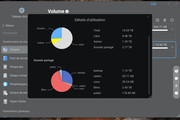
Hardly the "same problem" imo given the disparity in the space occupied by "others" in the 2 systems. If you can use the console
you can list folders in /Volume[1-n] and see several such as /Volume1/@apps
These '@' folders are all system type folders used for apps, docker, thumbnails etc. If you have lots of images with thumbnails enabled that can be a 'space killer on some systems.
With "others" space being about 10% or less of total space and with plenty of free space you don't appear to have anything to worry about.
And please don't start deleting folders at random.
Re: [Help] F4-424 Backup Image File System Snapshot
Posted: 11 Jun 2025, 16:52
by razor31
Thank you very much for your quick response, Gremlin.
I'll quickly check the console to see if there are any unnecessary folders taking up space.
Since I'm a novice, I wouldn't risk deleting folders.
If I can't find them easily, I'll leave them as they are, since they take up very little space.
Thanks, Gremlin.