[Help] F4-424 Backup Image File System Snapshot

RAID, Volume, storage pool, hard drive, USB, SSD cache and iSCSI LUN
Post Reply
User avatar
jemlinus
Posts: 12
Joined: 11 Apr 2024, 20:35
Canada

[Help] F4-424 Backup Image File System Snapshot

Post by jemlinus »

Hi,

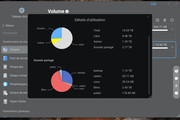
I'm having trouble reclaiming space on my NAS. I had previously enabled File System Snapshots, but I’ve since deleted the backups and switched to using USB backups.

However, I'm seeing a discrepancy: the total size of the files currently stored on the NAS is around 12TB, but the system reports that I'm using approximately 23TB. I checked the File System Snapshots section, and there doesn't appear to be anything left there.

Is there a way to check for any hidden or unnecessary files still occupying space on the system?

Any help would be greatly appreciated.

Best regards,
Image
User avatar
GevinKe
TM Product Manager
Posts: 251
Joined: 08 Dec 2023, 10:27
China

Re: [Help] F4-424 Backup Image File System Snapshot

Post by GevinKe »

jemlinus wrote: 10 May 2025, 08:15 Hi,

I'm having trouble reclaiming space on my NAS. I had previously enabled File System Snapshots, but I’ve since deleted the backups and switched to using USB backups.

However, I'm seeing a discrepancy: the total size of the files currently stored on the NAS is around 12TB, but the system reports that I'm using approximately 23TB. I checked the File System Snapshots section, and there doesn't appear to be anything left there.

Is there a way to check for any hidden or unnecessary files still occupying space on the system?

Any help would be greatly appreciated.

Best regards,

Image
You may refer to the following guide for troubleshooting:
viewtopic.php?t=6999
We hope these steps will help you resolve the current issue smoothly.
To contact our team, please send email to following addresses, remember to replace (at) with @:

Technical team: support(at)terra-master.com(for technical support)
Service team: service(at)terra-master.com(for purchasing, return, replacement, RMA service)
User avatar
jemlinus
Posts: 12
Joined: 11 Apr 2024, 20:35
Canada

Re: [Help] F4-424 Backup Image File System Snapshot

Post by jemlinus »

Unfortunately, all are empty. It's weird
User avatar
OrionXie
TM Support
Posts: 151
Joined: 14 Apr 2025, 18:30
Saudi Arabia

Re: [Help] F4-424 Backup Image File System Snapshot

Post by OrionXie »

jemlinus wrote: 12 May 2025, 05:25
Hi, jemlinus。 Regarding your situation, please keep in touch with technical support via email or LiveChat.
To contact our team, please send email to following addresses. "(at)" = "@"
Technical team: support(at)terra-master.com
Service team: service(at)terra-master.com
User avatar
razor31
Posts: 2
Joined: 31 Jan 2025, 20:48
France

Re: [Help] F4-424 Backup Image File System Snapshot

Post by razor31 »

Hello,

Have you found a solution? I have the same problem.

Sincerely,


Image
User avatar
Gremlin
Gold Member
Posts: 1627
Joined: 02 Dec 2022, 22:31
Great Britain

Re: [Help] F4-424 Backup Image File System Snapshot

Post by Gremlin »

razor31 wrote: 11 Jun 2025, 15:23 Hello,

Have you found a solution? I have the same problem.

Sincerely,


Image
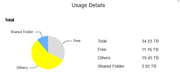
Hardly the "same problem" imo given the disparity in the space occupied by "others" in the 2 systems. If you can use the console
you can list folders in /Volume[1-n] and see several such as /Volume1/@apps
These '@' folders are all system type folders used for apps, docker, thumbnails etc. If you have lots of images with thumbnails enabled that can be a 'space killer on some systems.
With "others" space being about 10% or less of total space and with plenty of free space you don't appear to have anything to worry about.

And please don't start deleting folders at random.
F5-221 TOS7.0.0777 - 4x4TB (Ironwolf) Traid
F2-424 TOS7.0.0777 - 2x500GB nvme (P3) Traid, 2x6TB HDD (HGST) Traid
F2-221 TOS7.0.0777 - 1x3TB Ext4, 1x4TB Btrfs
F2-425+ TOS7.0.0777 - 2x500GB nvme (P3) Traid, 2x6TB HDD (EXOS) Traid
User avatar
razor31
Posts: 2
Joined: 31 Jan 2025, 20:48
France

Re: [Help] F4-424 Backup Image File System Snapshot

Post by razor31 »

Gremlin wrote: 11 Jun 2025, 16:33
Thank you very much for your quick response, Gremlin.
I'll quickly check the console to see if there are any unnecessary folders taking up space.
Since I'm a novice, I wouldn't risk deleting folders.
If I can't find them easily, I'll leave them as they are, since they take up very little space.

Thanks, Gremlin.
Post Reply

Return to “Storage”