[Help] Insufficient memory to complete this operation
Posted: 01 May 2025, 00:49
Hello there.
I've just got a Terramaster F4-212 NAS with TOS version 5.1.73-00078.
The installation went all right, setting it up as a RAID1, with two 4TB HDD making a "volume1", and two 2TB HDD making a "volume2".
At first it all worked well, having an admin user for both volumes, and, lets say, "user1" for "volume1" and "user2" for "volume2".
"user2" with "volume2" works just fine.
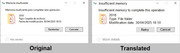
But "user1" with "volume1" just started to give me a strange error when transferring files through Windows 10 (it doesn't if I do it through the web browser with TOS). Randomly, but like the 90% of the time, when transferring files from the computer to the NAS, I get this error message:
(I translated it if it helps)
- "volume1" is at 41% capacity: used capacity 1.51TB from a total capacity of 3.63TB.
- RAM memory of the NAS is at a stable 25.03% as normal.
I tryed restarting both the computer and the NAS, and I have also cleaned the "SMB cache" from the TOS menu, if it could do something, but it didn't.
I don't know, at first it worked well.
If you guys could help me out, I would really appreciate it.
Thank you in advance.
Mike
I've just got a Terramaster F4-212 NAS with TOS version 5.1.73-00078.
The installation went all right, setting it up as a RAID1, with two 4TB HDD making a "volume1", and two 2TB HDD making a "volume2".
At first it all worked well, having an admin user for both volumes, and, lets say, "user1" for "volume1" and "user2" for "volume2".
"user2" with "volume2" works just fine.
But "user1" with "volume1" just started to give me a strange error when transferring files through Windows 10 (it doesn't if I do it through the web browser with TOS). Randomly, but like the 90% of the time, when transferring files from the computer to the NAS, I get this error message:
(I translated it if it helps)
- "volume1" is at 41% capacity: used capacity 1.51TB from a total capacity of 3.63TB.
- RAM memory of the NAS is at a stable 25.03% as normal.
I tryed restarting both the computer and the NAS, and I have also cleaned the "SMB cache" from the TOS menu, if it could do something, but it didn't.
I don't know, at first it worked well.
If you guys could help me out, I would really appreciate it.
Thank you in advance.
Mike