Page 1 of 1
Update to 6.0.673, broke Qbittorrent
Posted: 30 Apr 2025, 04:46
by WhitePastor
After the update i get nginx 502 error on the qbittorrent page.
Haven't applied any changes the default ports are 8181 and 5443.
Any ideas?
Re: Update to 6.0.673, broke Qbittorrent
Posted: 30 Apr 2025, 16:35
by OrionXie
Perhaps you can try uninstalling the qbittorrent application, deleting the qbittorrent shared folder, and reinstalling the application. Can you provide the specific version of the TOS system before the upgrade? thank you.
Re: Update to 6.0.673, broke Qbittorrent
Posted: 30 Apr 2025, 22:23
by WhitePastor
I tried clean installation, uninstalling configs same...
I keep up to date with TOS6
Re: Update to 6.0.673, broke Qbittorrent
Posted: 01 May 2025, 08:38
by TMeric
WhitePastor wrote: ↑30 Apr 2025, 22:23
I tried clean installation, uninstalling configs same...
I keep up to date with TOS6
You can try reinstalling qBittorrent by following these steps:
1.Uninstall the current version of qBittorrent: First, uninstall the existing version of qBittorrent and choose to remove all configuration files during the uninstallation process.
2.Delete the qBittorrent shared folder: Go to the Control Panel and find and delete the qBittorrent shared folder. If there are important files in that folder, be sure to transfer them to another location beforehand.
3.Reinstall qBittorrent: After completing the above steps, you can reinstall qBittorrent from the application center.
hope this can help you.
Re: 6.0.673に更新し、Qbittorrentを壊した
Posted: 01 May 2025, 21:37
by danx
私も 6.0.73にアップデート後qBittorrentのバージョンを4.1.15にアップデートしたら、
qBitotorrentを立ち上げたところ502エラーが出るようになりました
ダウンロードリストをやtorrentファイルを消すことがなくリカバリーをすることを望んでいます。
初期化やアンインストールをせずに復旧できればと思います
After updating to 6.0.73, I also updated the version of qBittorrent to 4.1.15,
When I started qBitotorrent, I started to get a 502 error.
I hope to recover without erasing the download list or torrent files.
I hope I can recover it without initializing or uninstalling it.
Re: Update to 6.0.673, broke Qbittorrent
Posted: 01 May 2025, 22:18
by TMeric
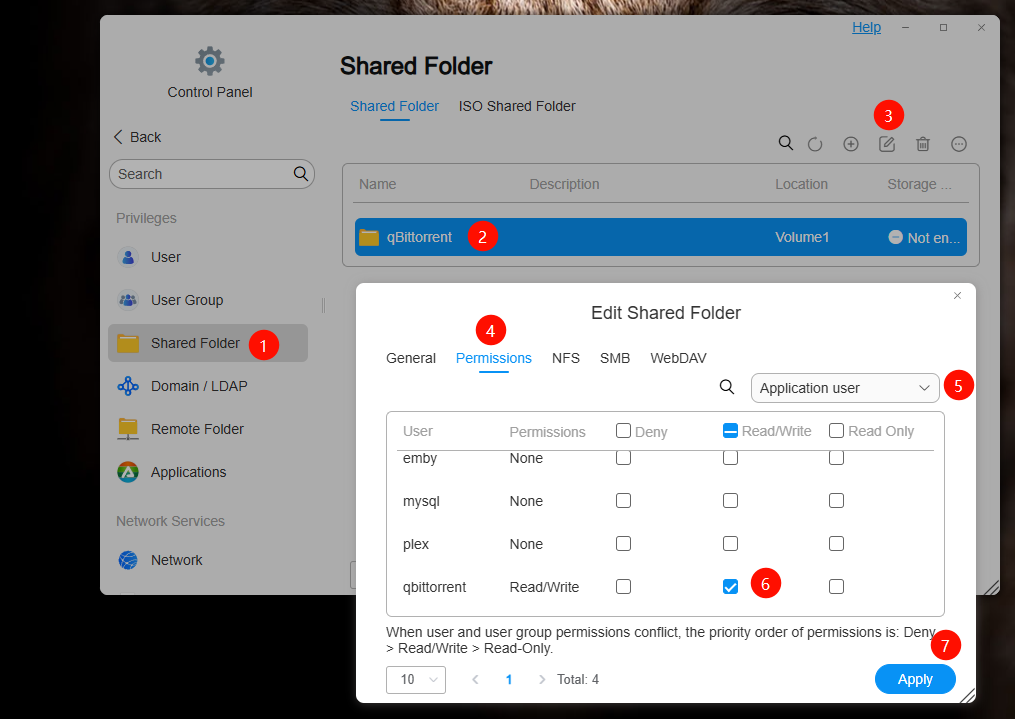
You can also check if the qBittorrent application user has read and write permissions for the qBittorrent shared folder. It’s possible that the permissions were lost during the upgrade process. The steps are shown in the image below:
Re: Update to 6.0.673, broke Qbittorrent
Posted: 03 May 2025, 13:47
by WhitePastor
Well I ended up restarting to factory settings as I couldn't find anything wrong in the bitorrent service config...
But now works, thanks for support guys