Gremlin wrote: ↑25 Apr 2025, 18:18
I have recently been testing out backup processes to establish which may be the better method for backups of File storage on other nas devices. (Mostly the backups of backups).
The 'destination' is typically a -221 model NAS on which I would use Rsync Server or TFM backup. Accepting that the -221 is an older, less powerful device it does bother me that, when a backup is running (with either service) the destination device slows to a crawl. 'Load' is shown as 90%+ and cpu usage is >80%. (Memory has been upgraded and does not seem to impact.)
This is the hdd i/o and Lan activity during a TFM backup as seen on -221: (source is 5Gbe bandwidth bond, destination 2.5Gbe lan via a single 2.5gbe managed switch. Destination disk is a single hdd.)
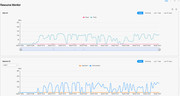
I guess my question is can the user do anything to force the backup process to a somewhat lower priority background task that will allow the destination device to function in a "usable" manner during backups.
TFM mirror is fast enough in itself (as little as 5 seconds for a single file) when only processing incremental changes and smaller files ( 100 - 800Mb) but the nas really slows down for the new 90GB+ full backup files.
Thank you very much for your suggestion! As we all know, backup speed is influenced by a combination of factors, including the backup algorithm, network transmission rate, and disk read/write performance.
Regarding the issue of high NAS load causing sluggish responsiveness, system load depends not only on hardware performance (CPU, memory, etc.) but also closely on network and disk I/O. When network and disks are under heavy load, the NAS load will rise accordingly (Linux uses specific formulas to calculate load—you can refer to relevant documentation for details).
To address this, we believe it’s essential to reserve sufficient CPU and memory resources for critical system functions to ensure stable operation without disrupting backup tasks. Accordingly, in the latest TOS 6.0.673 release, we’ve introduced a cgroup control mechanism to improve responsiveness. We’re also continuously optimizing our backup algorithms to further boost backup speed.
Thank you again for your valuable feedback!
To contact our team, please send email to following addresses, remember to replace (at) with @:
Technical team: support(at)terra-master.com(for technical support)
Service team: service(at)terra-master.com(for purchasing, return, replacement, RMA service)


