
How can I configure versioning of stored files? We are not talking about new backups. But about files that are simply stored, manually loaded into a folder, and periodically changed.
Windows and Apple have such mechanisms for files stored in the system, look at their earlier versions.
[Help] Versioning of stored files
[Help] Versioning of stored files
TerraMaster F8, TerraMaster F2-425, Syno 218+


Re: [Help] Versioning of stored files
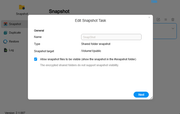
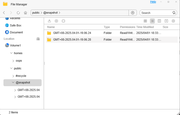
Hello! You can download and install the snapshot application through the application center. In this application, you can take a snapshot of your shared folder and save the version you want. Snapshot supports manual shooting, as well as setting scheduled tasks for timed automatic shooting. In shared folder snapshot tasks, you can control the version of stored files from the snapshot list.
I hope it can help you!

Re: [Help] Versioning of stored files
To contact our team, please send email to following addresses, remember to replace (at) with @:
Technical team: support(at)terra-master.com (for technical support)
Service team: service(at)terra-master.com (for purchasing, return, replacement, RMA service)
Technical team: support(at)terra-master.com (for technical support)
Service team: service(at)terra-master.com (for purchasing, return, replacement, RMA service)
-
KolbyHodkiewicz

- Posts: 2
- Joined: 02 Apr 2025, 16:11

Re: [Help] Versioning of stored files
Does the snapshot support manual shooting have manual shooting? I thought there was only automatic shooting. Can you guide me how to shoot manually??TMbuddy wrote: ↑01 Apr 2025, 10:03Hello! You can download and install the snapshot application through the application center. In this application, you can take a snapshot of your shared folder and save the version you want. Snapshot supports manual shooting, as well as setting scheduled tasks for timed automatic shooting. In shared folder snapshot tasks, you can control the version of stored files from the geometry dash meltdownsnapshot list.
I hope it can help you!

Last edited by KolbyHodkiewicz on 02 Apr 2025, 16:15, edited 1 time in total.
-
KolbyHodkiewicz
- Posts: 2
- Joined: 02 Apr 2025, 16:11
Re: [Help] Versioning of stored files
Are the storage lists when taking snapshots complete? I see many photos are missing...KolbyHodkiewicz wrote: ↑02 Apr 2025, 16:13Does the snapshot support manual shooting have manual shooting? I thought there was only automatic shooting. Can you guide me how to shoot manually??TMbuddy wrote: ↑01 Apr 2025, 10:03Hello! You can download and install the snapshot application through the application center. In this application, you can take a snapshot of your shared folder and save the version you want. Snapshot supports manual shooting, as well as setting scheduled tasks for timed automatic shooting. In shared folder snapshot tasks, you can control the version of stored files from the snapshot list.
I hope it can help you!
Re: [Help] Versioning of stored files
Please manually take a snapshot using the button that resembles a camera.
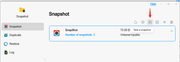
The mentioned anomaly has not been detected.
Please note that the snapshot feature in the Snapshot app is intended for individual shared folders rather than entire volumes.
If your photos are located in other shared folders, you need to take a separate snapshot for each folder containing the photos.
To contact our team, please send email to following addresses, remember to replace (at) with @:
Technical team: support(at)terra-master.com (for technical support)
Service team: service(at)terra-master.com (for purchasing, return, replacement, RMA service)
Technical team: support(at)terra-master.com (for technical support)
Service team: service(at)terra-master.com (for purchasing, return, replacement, RMA service)