(Guide)TerraMaster Docker Manager Jellyfin hardware transcodeing enabled
Posted: 30 Mar 2025, 22:24
Hello quick guide on how to enable the transcodeing on jellyfin and setup jellyfin on TOS.
if you do not know how to find the Volumes and directory all you have to do is open file manager and right click and click property it will then say the location you need to enter in the YAML file
---
services:
jellyfin:
image: lscr.io/linuxserver/jellyfin:latest
container_name: jellyfin
environment:
PUID=0
PGID=0
TZ=UTC+01:00
JELLYFIN_PublishedServerUrl=http://192.168.*.*
DOCKER_MODS=linuxserver/mods:jellyfin-opencl-intel
volumes:
/Volume1/public/jellyfin/config:/config
/Volume1/tvshows:/data/tvshows
/Volume1/movies:/data/movies
devices:
/dev/dri:/dev/dri
ports:
8096:8096
8920:8920
7359:7359/udp
1900:1900/udp
restart: unless-stopped
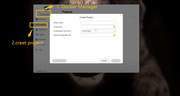
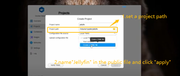
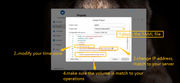
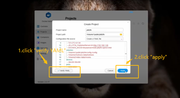
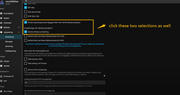
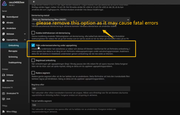
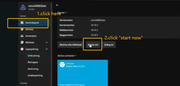
Here are the steps for your reference.
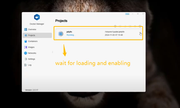
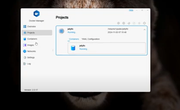
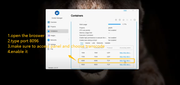

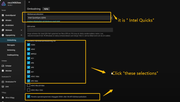
if you do not know how to find the Volumes and directory all you have to do is open file manager and right click and click property it will then say the location you need to enter in the YAML file
---
services:
jellyfin:
image: lscr.io/linuxserver/jellyfin:latest
container_name: jellyfin
environment:
PUID=0
PGID=0
TZ=UTC+01:00
JELLYFIN_PublishedServerUrl=http://192.168.*.*
DOCKER_MODS=linuxserver/mods:jellyfin-opencl-intel
volumes:
/Volume1/public/jellyfin/config:/config
/Volume1/tvshows:/data/tvshows
/Volume1/movies:/data/movies
devices:
/dev/dri:/dev/dri
ports:
8096:8096
8920:8920
7359:7359/udp
1900:1900/udp
restart: unless-stopped
Here are the steps for your reference.