Mediadb service location
Posted: 17 Feb 2025, 20:41
Hello!
I found that HDD's in my NAS make some noise when I'm definitely not using them..
After some investigation, I found this unexpected activity:
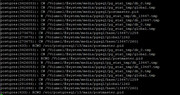
So, there's a media service that uses postgres and a service directory is created on Volume1, which is accessed every few seconds.
The disks do not go to sleep.

I'm trying to figure out how to move this directory to another Volume2, or where the configuration is located, in which a specific startup path is specified.
If anyone has encountered such a problem, I would appreciate any advice!
I found that HDD's in my NAS make some noise when I'm definitely not using them..
After some investigation, I found this unexpected activity:
Code: Select all
CW /Volume1/@system/media/pgsql/*So, there's a media service that uses postgres and a service directory is created on Volume1, which is accessed every few seconds.
The disks do not go to sleep.
Code: Select all
mediadb.service
/usr/lib/postgresql/13/bin/postgres -D /Volume1/@system/media/pgsql
I'm trying to figure out how to move this directory to another Volume2, or where the configuration is located, in which a specific startup path is specified.
If anyone has encountered such a problem, I would appreciate any advice!