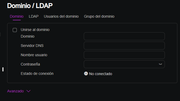
Hello to everything, I have a question that I hope can help me, if I have a domain bought from Hostinger, how can I link my nas to that domain so that I can access my website anywhere?
I try the NO-IP DNS service but it does not let me access from my cell phone with my data, and I think that acquiring a web domain can already access from there, but I do not know how to link my nas to my domain.
I hope you can help me with this, because the truth is already without ideas.
Hi, dear customer.
You seem to need to set up a domain name for your NAS to achieve remote access.
If that's the case, the options in your screenshot are completely unrelated to this.
You have a DDNS domain name for No IP, so you can fill in the information in TOS - Control Panel - Remote Access - DDNS to synchronize the IP change to the domain name.
In addition, you also need to open the router and configure port mapping. viewtopic.php?t=433
To contact our team, please send email to following addresses, remember to replace (at) with @:
Technical team: support(at)terra-master.com (for technical support)
Service team: service(at)terra-master.com (for purchasing, return, replacement, RMA service)
Very good, but I have another question, I have already used an DDNS server that is NO-IP and already configure my router, but sometimes it worked and other times I did not connect with the domain. Could you say that my router is the problem or is it normal for that to happen?
This issue might not be easily determined. Perhaps you could try replacing the domain name with the WAN IP when the problem occurs and reconnect, to determine whether it is a DNS resolution issue or a network connectivity issue.
To contact our team, please send email to following addresses, remember to replace (at) with @:
Technical team: support(at)terra-master.com (for technical support)
Service team: service(at)terra-master.com (for purchasing, return, replacement, RMA service)