Page 1 of 2
Internal boot drive exposed as usb?
Posted: 02 Feb 2025, 01:57
by jollino
Hello all, I have an F4-423 that’s currently running the latest TOS 6.0.610.
Ever since upgrading to 6.0.577, however, it shows an USB disk that’s connected and accessible by all users. I think it’s the default boot unit, as it’s 4 GB in size and has EFI and Boot data (including a grub bootloader configuration). Is that expected, or is this a glitch?
Rebooting doesn’t seem to hide it, it just possibly changes the device name (eg. sde or sdf) if other actual usb disks are mounted at boot.
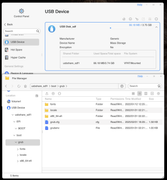
Re: Internal boot drive exposed as usb?
Posted: 02 Feb 2025, 09:59
by RyanYang
Have you tried actively clicking the security pop-up button and then restarting again? This might help resolve the issue.
Re: Internal boot drive exposed as usb?
Posted: 02 Feb 2025, 13:49
by jollino
Hello, could you please explain what the security pop up button is? I don’t think I have touched anything if the sort as it doesn’t ring a bell. Thanks in advance!
Re: Internal boot drive exposed as usb?
Posted: 02 Feb 2025, 15:33
by jollino
No, I don’t think I’ve ever gotten that. At most I get the notification when I access the NAS via ssh, but there’s no identification involved.
Why would the boot disk show up randomly though? Is there any way to make TOS hide it? I tried changing the permissions but they’re locked, and all users can access it.
Re: Internal boot drive exposed as usb?
Posted: 12 Mar 2025, 00:25
by jollino
For the record, this keeps happening with 6.0.648.
Even weirder, another Samba network item has showed up on my network coming from the NAS, named "ps2022igwxuxkn". What is going on?
Re: Internal boot drive exposed as usb?
Posted: 12 Mar 2025, 15:16
by TMzethar
Could you please tell us your TNAS model?
Perhaps you could try resetting the USB internal boot drive:
viewtopic.php?t=6433
Regarding the 'ps2022igwxuxkn' you mentioned, this does not appear to be a network name that a NAS would release; it seems more like the name of some computer device produced by 'PS' in 2022.
Re: Internal boot drive exposed as usb?
Posted: 12 Mar 2025, 18:35
by jollino
Hi TMzethar, it's a F4-423 running 6.0.648 now (610 when I opened the post). The extra share started showing up after a reboot, not even after an update, so I'm not sure what would have damaged it. Is there a guide on how to remove the internal boot drive? I don't recall seeing it when I installed the additional RAM but I wasn't specifically looking for it. EDIT: never mind, found it at
https://youtu.be/5zz4netQZRc?feature=shared&t=164 
I'll do it as soon as I have some time to take it apart.
The content of the share seems fine however (typical stuff one would expect from a linux boot disk), it's just that for some reason TNAS is not ignoring it and shows it as an external disk.
Regarding ps2022igwxuxkn, I can confirm that is indeed the NAS:
Code: Select all
octavarium:~ jollino$ smbutil lookup ps2022igwxuxkn
Got response from 192.168.0.50
IP address of ps2022igwxuxkn: 192.168.0.50
That is the the correct IP and I actually access its shares through that weird name:
Code: Select all
octavarium:~ jollino$ smbutil view //ps2022igwxuxkn
Password for ps2022igwxuxkn:
Share                                           Type    Comments
-------------------------------
TimeMachine                                     Disk
IPC$                                            Pipe    IPC Service (Supernova)
jollino                                         Disk    Home Directories
usbshare_sde1                                   Disk

4 shares listed
This also came up out of nowhere a few days ago. I also haven't installed any apps or anything weird. I did notice, AFTER seeing this show up on the network, that my Samba settings had been reset to default (including disabling the custom ones).
Also note that the 'ps2022igwxuxkn' instance is accessible from other devices as well, not just my main Mac.
I haven't tried rebooting yet, let me know if you want me to get any specific logs before I do.
Re: Internal boot drive exposed as usb?
Posted: 12 Mar 2025, 19:49
by Gremlin
Never hurts to generate a system report and keep it on your pc (or whatever) if you are changing things. They are mostly text readable files in a .zip package. If the device is running for long, some of the logs can get rather large though (generating a zip file too large for most email services)
Re: Internal boot drive exposed as usb?
Posted: 13 Mar 2025, 10:02
by TMlinda
Regarding ps2022igwxuxkn, it should not be sent by our TNAS. You can try to check again after shutting down the TNAS device.
Regarding how to remove the internal boot drive, you can log in to the terminal and execute this command:
Code: Select all
systemctl start tnas-umount-usb.service
Re: Internal boot drive exposed as usb?
Posted: 13 Mar 2025, 17:56
by jollino
Hi Linda,
I did as you suggested but the ps2022 server became unavailable when the NAS was turned off:
Code: Select all
octavarium:~ jollino$ smbutil lookup ps2022igwxuxkn
smbutil: unable to resolve ps2022igwxuxkn: No route to host
However, after a reboot it did not come back. No idea what happened there.
After starting the service, it seems like it's begun working over a reboot as well:
Code: Select all
master@Supernova:/# systemctl status tnas-umount-usb.service
● tnas-umount-usb.service - Umount USB at boot
     Loaded: loaded (/lib/systemd/system/tnas-umount-usb.service; enabled; vendor preset: enabled)
     Active: active (exited) since Thu 2025-03-13 10:50:58 CET; 1min 43s ago
   Main PID: 444 (code=exited, status=0/SUCCESS)
        CPU: 26ms

Mar 13 10:50:58 Supernova systemd[1]: Starting Umount USB at boot...
Mar 13 10:50:58 Supernova remove_usb[615]: USB device (sde) with label UTOSBOOT was removed after 0 attempts.
Mar 13 10:50:58 Supernova systemd[1]: Finished Umount USB at boot.
Thank you!
Just one question to better understand how the boot process works. Is the USB unit only used when there are no disks present and configured? That would explain why your colleague said in another thread that if I want to move these disks to another compatible NAS (e.g. a F6-424) I can just move them (in the same order, I suppose?) and it would boot just fine and retain all the configuration without having to go through the setup process again, and without any loss of data.