Scheduled Task Shutdown not working
Posted: 01 Feb 2025, 19:39
- TOS 6.0.610-00165
- Docker down (to be sure a docker container is not the problem)
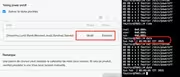
- in menu energy I deleted and inserted a lot of time new task to shutdown daily the F2-424.
I noticed the following:
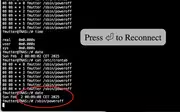
TOSDaemon[3252]: [DEBUG /etc/tos/scripts/powertimer: line 114: /etc/init.d/cron: No such file or directory
Line 114 of powertimer file is => /etc/init.d/cron restart >/dev/null &
107 local stop_list=($1)
108 for item_time in ${stop_list[@]}; do
109 local week=${item_time:0:1}
110 local hour=${item_time:1:2}
111 local minute=${item_time:3}
112 echo "$minute $hour * * $week $(whoami) /sbin/poweroff" >>/etc/crontab
113 done
114 /etc/init.d/cron restart >/dev/null &
115 }
there is no /etc/init.d/cron
the command ls -la /etc/cron.* returns (xxxx is my username)
/etc/cron.d:
total 24
drwxr-xr-x 2 xxxxx xxxxx 4096 Jan 8 08:38 .
drwxr-xr-x 150 xxxxx xxxxx 12288 Feb 1 11:25 ..
-rw-r--r-- 1 xxxxx xxxxx 102 Sep 29 05:16 .placeholder
-rw-r--r-- 1 xxxxx xxxxx 217 Jan 8 08:38 atop
/etc/cron.daily:
total 20
drwxr-xr-x 2 xxxxx xxxxx 4096 Sep 29 05:16 .
drwxr-xr-x 150 xxxxx xxxxx 12288 Feb 1 11:25 ..
-rw-r--r-- 1 xxxxx xxxxx 102 Sep 29 05:16 .placeholder
/etc/cron.hourly:
total 20
drwxr-xr-x 2 xxxxx xxxxx 4096 Sep 29 05:16 .
drwxr-xr-x 150 xxxxx xxxxx 12288 Feb 1 11:25 ..
-rw-r--r-- 1 xxxxx xxxxx 102 Sep 29 05:16 .placeholder
/etc/cron.monthly:
total 20
drwxr-xr-x 2 xxxxx xxxxx 4096 Sep 29 05:16 .
drwxr-xr-x 150 xxxxx xxxxx 12288 Feb 1 11:25 ..
-rw-r--r-- 1 xxxxx xxxxx 102 Sep 29 05:16 .placeholder
/etc/cron.weekly:
total 20
drwxr-xr-x 2 xxxxx xxxxx 4096 Sep 29 05:16 .
drwxr-xr-x 150 xxxxx xxxxx 12288 Feb 1 11:25 ..
-rw-r--r-- 1 xxxxx xxxxx 102 Sep 29 05:16 .placeholder
Can I do something in order to get shutting down working?
- Docker down (to be sure a docker container is not the problem)
- in menu energy I deleted and inserted a lot of time new task to shutdown daily the F2-424.
I noticed the following:
TOSDaemon[3252]: [DEBUG /etc/tos/scripts/powertimer: line 114: /etc/init.d/cron: No such file or directory
Line 114 of powertimer file is => /etc/init.d/cron restart >/dev/null &
107 local stop_list=($1)
108 for item_time in ${stop_list[@]}; do
109 local week=${item_time:0:1}
110 local hour=${item_time:1:2}
111 local minute=${item_time:3}
112 echo "$minute $hour * * $week $(whoami) /sbin/poweroff" >>/etc/crontab
113 done
114 /etc/init.d/cron restart >/dev/null &
115 }
there is no /etc/init.d/cron
the command ls -la /etc/cron.* returns (xxxx is my username)
/etc/cron.d:
total 24
drwxr-xr-x 2 xxxxx xxxxx 4096 Jan 8 08:38 .
drwxr-xr-x 150 xxxxx xxxxx 12288 Feb 1 11:25 ..
-rw-r--r-- 1 xxxxx xxxxx 102 Sep 29 05:16 .placeholder
-rw-r--r-- 1 xxxxx xxxxx 217 Jan 8 08:38 atop
/etc/cron.daily:
total 20
drwxr-xr-x 2 xxxxx xxxxx 4096 Sep 29 05:16 .
drwxr-xr-x 150 xxxxx xxxxx 12288 Feb 1 11:25 ..
-rw-r--r-- 1 xxxxx xxxxx 102 Sep 29 05:16 .placeholder
/etc/cron.hourly:
total 20
drwxr-xr-x 2 xxxxx xxxxx 4096 Sep 29 05:16 .
drwxr-xr-x 150 xxxxx xxxxx 12288 Feb 1 11:25 ..
-rw-r--r-- 1 xxxxx xxxxx 102 Sep 29 05:16 .placeholder
/etc/cron.monthly:
total 20
drwxr-xr-x 2 xxxxx xxxxx 4096 Sep 29 05:16 .
drwxr-xr-x 150 xxxxx xxxxx 12288 Feb 1 11:25 ..
-rw-r--r-- 1 xxxxx xxxxx 102 Sep 29 05:16 .placeholder
/etc/cron.weekly:
total 20
drwxr-xr-x 2 xxxxx xxxxx 4096 Sep 29 05:16 .
drwxr-xr-x 150 xxxxx xxxxx 12288 Feb 1 11:25 ..
-rw-r--r-- 1 xxxxx xxxxx 102 Sep 29 05:16 .placeholder
Can I do something in order to get shutting down working?