- TOS 6.0.610-00165
- Docker down (to be sure a docker container is not the problem)
- in menu energy I deleted and inserted a lot of time new task to shutdown daily the F2-424.
I noticed the following:
TOSDaemon[3252]: [DEBUG /etc/tos/scripts/powertimer: line 114: /etc/init.d/cron: No such file or directory
Line 114 of powertimer file is => /etc/init.d/cron restart >/dev/null &
107 local stop_list=($1)
108 for item_time in ${stop_list[@]}; do
109 local week=${item_time:0:1}
110 local hour=${item_time:1:2}
111 local minute=${item_time:3}
112 echo "$minute $hour * * $week $(whoami) /sbin/poweroff" >>/etc/crontab
113 done
114 /etc/init.d/cron restart >/dev/null &
115 }
there is no /etc/init.d/cron
the command ls -la /etc/cron.* returns (xxxx is my username)
/etc/cron.d:
total 24
drwxr-xr-x 2 xxxxx xxxxx 4096 Jan 8 08:38 .
drwxr-xr-x 150 xxxxx xxxxx 12288 Feb 1 11:25 ..
-rw-r--r-- 1 xxxxx xxxxx 102 Sep 29 05:16 .placeholder
-rw-r--r-- 1 xxxxx xxxxx 217 Jan 8 08:38 atop
/etc/cron.daily:
total 20
drwxr-xr-x 2 xxxxx xxxxx 4096 Sep 29 05:16 .
drwxr-xr-x 150 xxxxx xxxxx 12288 Feb 1 11:25 ..
-rw-r--r-- 1 xxxxx xxxxx 102 Sep 29 05:16 .placeholder
/etc/cron.hourly:
total 20
drwxr-xr-x 2 xxxxx xxxxx 4096 Sep 29 05:16 .
drwxr-xr-x 150 xxxxx xxxxx 12288 Feb 1 11:25 ..
-rw-r--r-- 1 xxxxx xxxxx 102 Sep 29 05:16 .placeholder
/etc/cron.monthly:
total 20
drwxr-xr-x 2 xxxxx xxxxx 4096 Sep 29 05:16 .
drwxr-xr-x 150 xxxxx xxxxx 12288 Feb 1 11:25 ..
-rw-r--r-- 1 xxxxx xxxxx 102 Sep 29 05:16 .placeholder
/etc/cron.weekly:
total 20
drwxr-xr-x 2 xxxxx xxxxx 4096 Sep 29 05:16 .
drwxr-xr-x 150 xxxxx xxxxx 12288 Feb 1 11:25 ..
-rw-r--r-- 1 xxxxx xxxxx 102 Sep 29 05:16 .placeholder
Can I do something in order to get shutting down working?
Scheduled Task Shutdown not working
-
FredMutter

- Posts: 94
- Joined: 17 Jan 2025, 20:11

Scheduled Task Shutdown not working
Model: F2-424 with TOS 7.0.1105 - currently changing every month  - Bios V08
you can discuss with me in French, German and English
- Bios V08you can discuss with me in French, German and English


Re: Scheduled Task Shutdown not working
hello!
We have received your feedback. In order to ensure the accuracy of the issue, our lab team needs further verification to confirm if this is a system vulnerability or anomaly. We will complete the relevant tests as soon as possible and get back to you with the results in a timely manner.
If you have any additional questions or need further assistance, please feel free to contact us.
Thank you very much for your support of TerraMaster!
-
FredMutter
- Posts: 94
- Joined: 17 Jan 2025, 20:11
Re: Scheduled Task Shutdown not working
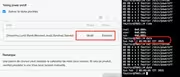
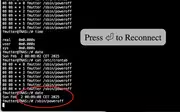
1. I scheduled a shutdown for 8:08.
2. The crontab file was configured correctly.
3. The shutdown did not execute automatically.
4. When I manually ran the shutdown command one minute later, it worked.
5. Possible cause: The cron daemon might not be running.
2. The crontab file was configured correctly.
3. The shutdown did not execute automatically.
4. When I manually ran the shutdown command one minute later, it worked.
5. Possible cause: The cron daemon might not be running.
Model: F2-424 with TOS 7.0.1105 - currently changing every month - Bios V08
you can discuss with me in French, German and English
- Bios V08you can discuss with me in French, German and English
-
FredMutter
- Posts: 94
- Joined: 17 Jan 2025, 20:11
Re: Scheduled Task Shutdown not working
very strange cron daemon is working :-/
fmutter@TNAS:/# sudo systemctl status cron
● cron.service - Regular background program processing daemon
Loaded: loaded (/lib/systemd/system/cron.service; enabled; vendor preset: enabled)
Active: active (running) since Sun 2025-02-02 08:20:02 CET; 10min ago
Docs: man:cron(8)
Main PID: 3289 (cron)
Tasks: 1 (limit: 9167)
Memory: 460.0K
CPU: 8ms
CGroup: /system.slice/cron.service
└─3289 /usr/sbin/cron -f -P
added a task to run minutely :
crontab -e
* * * * * echo "Cron is working" >> /tmp/cron-test.log
temp. location of file "/tmp/crontab.jxhqxZ/crontab" 24L, 944B
after a while:
fmutter@TNAS:/# cat /tmp/cron-test.log
Cron is working
Cron is working
Cron is working
so it seems now that the cat /etc/crontab will not be read
27 08 * * 0 fmutter /sbin/poweroff
27 08 * * 1 fmutter /sbin/poweroff
27 08 * * 2 fmutter /sbin/poweroff
27 08 * * 3 fmutter /sbin/poweroff
27 08 * * 4 fmutter /sbin/poweroff
27 08 * * 5 fmutter /sbin/poweroff
27 08 * * 6 fmutter /sbin/poweroff
26 08 * * 0 fmutter /sbin/poweroff
26 08 * * 1 fmutter /sbin/poweroff
26 08 * * 2 fmutter /sbin/poweroff
26 08 * * 3 fmutter /sbin/poweroff
26 08 * * 4 fmutter /sbin/poweroff
26 08 * * 5 fmutter /sbin/poweroff
26 08 * * 6 fmutter /sbin/poweroff
my entry * * * * * echo "Cron is working" is not present in this file
fmutter@TNAS:/# sudo systemctl status cron
● cron.service - Regular background program processing daemon
Loaded: loaded (/lib/systemd/system/cron.service; enabled; vendor preset: enabled)
Active: active (running) since Sun 2025-02-02 08:20:02 CET; 10min ago
Docs: man:cron(8)
Main PID: 3289 (cron)
Tasks: 1 (limit: 9167)
Memory: 460.0K
CPU: 8ms
CGroup: /system.slice/cron.service
└─3289 /usr/sbin/cron -f -P
added a task to run minutely :
crontab -e
* * * * * echo "Cron is working" >> /tmp/cron-test.log
temp. location of file "/tmp/crontab.jxhqxZ/crontab" 24L, 944B
after a while:
fmutter@TNAS:/# cat /tmp/cron-test.log
Cron is working
Cron is working
Cron is working
so it seems now that the cat /etc/crontab will not be read
27 08 * * 0 fmutter /sbin/poweroff
27 08 * * 1 fmutter /sbin/poweroff
27 08 * * 2 fmutter /sbin/poweroff
27 08 * * 3 fmutter /sbin/poweroff
27 08 * * 4 fmutter /sbin/poweroff
27 08 * * 5 fmutter /sbin/poweroff
27 08 * * 6 fmutter /sbin/poweroff
26 08 * * 0 fmutter /sbin/poweroff
26 08 * * 1 fmutter /sbin/poweroff
26 08 * * 2 fmutter /sbin/poweroff
26 08 * * 3 fmutter /sbin/poweroff
26 08 * * 4 fmutter /sbin/poweroff
26 08 * * 5 fmutter /sbin/poweroff
26 08 * * 6 fmutter /sbin/poweroff
my entry * * * * * echo "Cron is working" is not present in this file
Model: F2-424 with TOS 7.0.1105 - currently changing every month - Bios V08
you can discuss with me in French, German and English
- Bios V08you can discuss with me in French, German and English
-
FredMutter
- Posts: 94
- Joined: 17 Jan 2025, 20:11
Re: Scheduled Task Shutdown not working
and one more info to complete this item
ps aux|grep cron
fmutter 3289 0.0 0.0 4400 2824 ? Ss 08:19 0:00 /usr/sbin/cron -f -P
fmutter 6474 0.0 0.0 208 20 ? S 08:20 0:00 s6-supervise cron
fmutter 6508 0.0 0.0 3740 2064 ? S 08:20 0:00 /usr/sbin/cron -f
fmutter 41337 0.0 0.0 4016 2180 pts/4 S+ 10:01 0:00 grep --color=auto cron
ps aux|grep cron
fmutter 3289 0.0 0.0 4400 2824 ? Ss 08:19 0:00 /usr/sbin/cron -f -P
fmutter 6474 0.0 0.0 208 20 ? S 08:20 0:00 s6-supervise cron
fmutter 6508 0.0 0.0 3740 2064 ? S 08:20 0:00 /usr/sbin/cron -f
fmutter 41337 0.0 0.0 4016 2180 pts/4 S+ 10:01 0:00 grep --color=auto cron
Model: F2-424 with TOS 7.0.1105 - currently changing every month - Bios V08
you can discuss with me in French, German and English
- Bios V08you can discuss with me in French, German and English
-
FredMutter
- Posts: 94
- Joined: 17 Jan 2025, 20:11
Re: Scheduled Task Shutdown not working
command: systemctl edit --full cron.service
returns:
[Unit]
Description=Regular background program processing daemon
Documentation=man:cron(8)
After=remote-fs.target nss-user-lookup.target
[Service]
EnvironmentFile=-/etc/default/cron
ExecStart=/usr/sbin/cron -f -P $EXTRA_OPTS
IgnoreSIGPIPE=false
KillMode=process
Restart=on-failure
[Install]
WantedBy=multi-user.target
returns:
[Unit]
Description=Regular background program processing daemon
Documentation=man:cron(8)
After=remote-fs.target nss-user-lookup.target
[Service]
EnvironmentFile=-/etc/default/cron
ExecStart=/usr/sbin/cron -f -P $EXTRA_OPTS
IgnoreSIGPIPE=false
KillMode=process
Restart=on-failure
[Install]
WantedBy=multi-user.target
Model: F2-424 with TOS 7.0.1105 - currently changing every month - Bios V08
you can discuss with me in French, German and English
- Bios V08you can discuss with me in French, German and English


Re: Scheduled Task Shutdown not working
If you are trying to use cron for scheduled tasks (as in linux), I think you can forget it. Cron is a 'root' task and 'root' is not a legitimate user in TOS. Use the 'Scheduled task' setup within the GUI and it will work (all other things being equal). I use it all the time for shutdown/startup daily and other tasks. {TOS may be based on Linux, but it is not Linux!}
F5-221 TOS7.0.1278 - 4x4TB (Ironwolf) Traid
F2-424 TOS7.0.1278 - 2x500GB nvme (P3) Traid, 2x6TB HDD (HGST) Traid
F2-221 TOS7.0.1278 - 1x3TB Ext4, 1x4TB Btrfs
F2-425+ TOS7.0.1278 - 2x500GB nvme (P3) Traid, 2x6TB HDD (EXOS) Traid
F2-424 TOS7.0.1278 - 2x500GB nvme (P3) Traid, 2x6TB HDD (HGST) Traid
F2-221 TOS7.0.1278 - 1x3TB Ext4, 1x4TB Btrfs
F2-425+ TOS7.0.1278 - 2x500GB nvme (P3) Traid, 2x6TB HDD (EXOS) Traid
-
FredMutter
- Posts: 94
- Joined: 17 Jan 2025, 20:11
Re: Scheduled Task Shutdown not working
>set the 'Scheduled task' setup within the GUI and it will work (all other things being equal).
This is my problem since 2 weeks it doesn't work: it was my first screenshot. And I really don't know why.
1. I analyzed cron and confirmed that it executes my own cron tasks correctly.
2. However, the GUI-scheduled shutdown task doesn’t work, even though the system crontab file exists (as shown in my second screenshot).
3. Docker isn’t the cause, since I manually shut it down, yet the GUI shutdown task still fails to execute.
4. I suppose cron is not running anymore as root and can therefore not read the system crontab file.
Because I have only one TOS I cannot compare my analysis with another installation
This is my problem since 2 weeks it doesn't work: it was my first screenshot. And I really don't know why.
1. I analyzed cron and confirmed that it executes my own cron tasks correctly.
2. However, the GUI-scheduled shutdown task doesn’t work, even though the system crontab file exists (as shown in my second screenshot).
3. Docker isn’t the cause, since I manually shut it down, yet the GUI shutdown task still fails to execute.
4. I suppose cron is not running anymore as root and can therefore not read the system crontab file.
Because I have only one TOS I cannot compare my analysis with another installation
Model: F2-424 with TOS 7.0.1105 - currently changing every month - Bios V08
you can discuss with me in French, German and English
- Bios V08you can discuss with me in French, German and English
Re: Scheduled Task Shutdown not working
Sorry, didn't notice 1st screenshot (thought it was all cli) - odd.
F5-221 TOS7.0.1278 - 4x4TB (Ironwolf) Traid
F2-424 TOS7.0.1278 - 2x500GB nvme (P3) Traid, 2x6TB HDD (HGST) Traid
F2-221 TOS7.0.1278 - 1x3TB Ext4, 1x4TB Btrfs
F2-425+ TOS7.0.1278 - 2x500GB nvme (P3) Traid, 2x6TB HDD (EXOS) Traid
F2-424 TOS7.0.1278 - 2x500GB nvme (P3) Traid, 2x6TB HDD (HGST) Traid
F2-221 TOS7.0.1278 - 1x3TB Ext4, 1x4TB Btrfs
F2-425+ TOS7.0.1278 - 2x500GB nvme (P3) Traid, 2x6TB HDD (EXOS) Traid
-
FredMutter
- Posts: 94
- Joined: 17 Jan 2025, 20:11
Re: Scheduled Task Shutdown not working
no problem 
Model: F2-424 with TOS 7.0.1105 - currently changing every month - Bios V08
you can discuss with me in French, German and English
- Bios V08you can discuss with me in French, German and English