Raid error

RAID, Volume, storage pool, hard drive, USB, SSD cache and iSCSI LUN
Locked
User avatar
FNIK
Posts: 28
Joined: 05 Dec 2024, 21:31
Germany

Raid error

Post by FNIK »

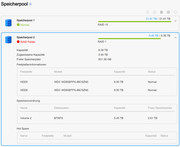
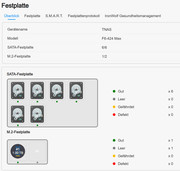
The M.2 Hypercache disk has failed. Since then, this storage pool (RAID 1 with 2 disks) has displayed a red exclamation mark and the text Raid error. There is no indication as to whether a repair is in progress or similar. Do I have to initiate this manually and if so, what is the procedure?
The device is a F6-424 Max.
Image
Image

Image
Last edited by FNIK on 20 Jan 2025, 14:27, edited 1 time in total.
User avatar
FNIK
Posts: 28
Joined: 05 Dec 2024, 21:31
Germany

Re: Raid error

Post by FNIK »

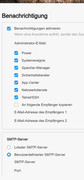
I have forgotten another interesting detail. There was no email that the M.2 has failed and there is an error on the RAID. Other mails arrive.
Image
User avatar
TMbuddy
TM Product Manager
Posts: 96
Joined: 29 Nov 2024, 14:29
China

Re: Raid error

Post by TMbuddy »

FNIK wrote: 20 Jan 2025, 00:42
Hello, we apologize for the inconvenience.
Did you use the M.2 hard drive to build an array when setting up the SSD cache? Please try shutting down the NAS first, then remove the M.2 drive, reinstall the other drives, and restart the system. If the issue persists, feel free to contact our support team for remote assistance.
Currently, there is no notification for abnormal array situations, but your feedback has been forwarded to the product team. Thank you for your understanding and support!
User avatar
FNIK
Posts: 28
Joined: 05 Dec 2024, 21:31
Germany

Re: Raid error

Post by FNIK »

The M.2 was only installed as a hypercache in balance mode for this RAID 1. Unfortunately, it now appears to be defective. I will replace it. But I believe that the RAID error will not go away. Then I will contact the service. Thank you!
User avatar
FNIK
Posts: 28
Joined: 05 Dec 2024, 21:31
Germany

Re: Raid error

Post by FNIK »

After I replaced the M.2 card with a new one, the red RAID error message disappeared. I think the error occurred because the SSD cache was still activated, but no M.2 was recognized.
Perhaps the error messages should be a little more detailed in future.
The case can be closed.
User avatar
CraftyClown
Posts: 47
Joined: 03 Jan 2023, 17:13
Great Britain

Re: Raid error

Post by CraftyClown »

Oooofff! Almost identical problem!

I was having strange issues with my server yesterday, docker containers not updating properly, errors with copied files etc. I rebooted and all the folders on my Raid appeared to be empty! I disabled the hypercache (balanced mode), rebooted and the Raid was back and working fine however as above, there is now a red RAID error message when I go into the storage pool menu.
Despite the error message if I check the disk menu everything is marked as good (green) including the SSD drive that was being used for the hypercache.

Also as above I received no warning buzzer or email to inform me there was a problem despite my system being configured for this, which I find very concerning

My server appears to be working fine now however I cannot get rid of the error message on the storage pool. How can I fix this if this is a bug and more importantly how do I check this isn't a more serious problem?
User avatar
HeliaWu
TM Support
Posts: 61
Joined: 22 Aug 2024, 18:54
China

Re: Raid error

Post by HeliaWu »

Hello, please initially deactivate Docker and proceed to create the SSD cache. Subsequently, attempt to re-enable Docker. It is possible that certain processes running within Docker are occupying the volume, which prevents it from being unloaded during the creation of the SSD cache, thereby causing issues.
Locked

Return to “Storage”