BTRFS compression disabled after reboot
Posted: 17 Jan 2025, 04:45
Hello TerraMaster:
With TOS 6.0.577 and TOS 6.0.610 and tested in several boxes (F8 Plus & F4 424 Max):
When BTRFS compression is enabled it works until the system is restarted. Once the system is rebooted the BTRFS filesystem is no longer mounted with compression enabled.
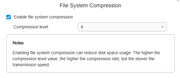
Before reboot:
/dev/mapper/vg0-lv0 on /Volume1 type btrfs (rw,noatime,compress=zlib:4,ssd,space_cache=v2,subvolid=256,subvol=/@)
After reboot:
/dev/mapper/vg0-lv0 on /Volume1 type btrfs (rw,noatime,ssd,space_cache=v2,subvolid=256,subvol=/@)
If compression settings are modified, then compression is reenabled... until next reboot...
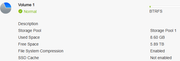
On the Control Panel side, the compression setting looks "enabled" but the filesystem its not mounted with compression enabled.
Thank you.
Regards!
With TOS 6.0.577 and TOS 6.0.610 and tested in several boxes (F8 Plus & F4 424 Max):
When BTRFS compression is enabled it works until the system is restarted. Once the system is rebooted the BTRFS filesystem is no longer mounted with compression enabled.
Before reboot:
/dev/mapper/vg0-lv0 on /Volume1 type btrfs (rw,noatime,compress=zlib:4,ssd,space_cache=v2,subvolid=256,subvol=/@)
After reboot:
/dev/mapper/vg0-lv0 on /Volume1 type btrfs (rw,noatime,ssd,space_cache=v2,subvolid=256,subvol=/@)
If compression settings are modified, then compression is reenabled... until next reboot...
On the Control Panel side, the compression setting looks "enabled" but the filesystem its not mounted with compression enabled.
Thank you.
Regards!