D6-320 corrupts HDD partitions after several hous of use  [SOLVED]

USB RAID storage for photographers, music producers, movie collectors
User avatar
WonderDog
Posts: 8
Joined: 09 Jan 2025, 19:47
Australia

D6-320 corrupts HDD partitions after several hous of use

Post by WonderDog »

My new D6-320 wipes my partitions after a few hours between 4-8 hours.

I have 2 Seagate IronWolf Pro 8TB - ST8000NT001 and 2 Seagate IronWolf 4TB - ST4000VN008

I got this DAS as I was using separate USB cases and my drives were overheating so looked to this model with its active cooling..

I have now had 7 wipes on all 4 drives in 3 days.

I get either an unallocated drive with out any partitions or a drive with two unallocated partitions with the first one being exactly 2048GB and the second one being the remaining space on the drive.

I also ended up with 2 drives with the same GUID

I was told it could be sleep but I have been in the middle of coping and the HDD has been very busy either doing surface scan or coping the data back.

I have sent USB hub controller to not sleep in Device Manager and HDD sleep after 60 minutes in the power profile so it should not be sleeping.

Also when the drives fail there are yellow errors for Portable device with he Drive Name in device manager. If I rescan for hardware changes the drives disappear from Disk Manager and Device Manager
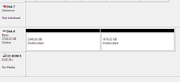
Image

EDIT: I just discovered that powering down the DAS after the devices are no longer present in the Device Manger seems to allow the USB Detect New Hardware to rediscover the drives with out any partition corruption. That means only 5 wipes so far.
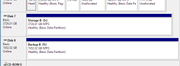
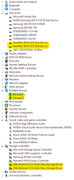
Image

Image

I need to solve this or return it.
User avatar
TMroy
TM Support
Posts: 3060
Joined: 10 Mar 2020, 14:04
China

Re: D6-320 corrupts HDD partitions after several hous of use

Post by TMroy »

Are you using the original USB cable and power adapter that came with the device?
To contact our team, please send email to following addresses, remember to replace (at) with @:
Support team: support(at)terra-master.com (for technical support only)
Service team: service(at)terra-master.com (for purchasing, return, replacement, RMA service)
User avatar
WonderDog
Posts: 8
Joined: 09 Jan 2025, 19:47
Australia

Re: D6-320 corrupts HDD partitions after several hous of use

Post by WonderDog »

Yes I am using the original PSU and Cable.


I also noticed that when the problem occurs the fan is still running as if it was under full load with no disk activity..

As soon as I force device manage to detect new hardware the fan slows down to idle and shortly later I think the disks spin down.

There are no activity on the left HDD led and the right led is solid green while doing this.
User avatar
TMLila
TM Product Manager
Posts: 90
Joined: 30 Apr 2024, 16:27
China

Re: D6-320 corrupts HDD partitions after several hous of use

Post by TMLila »

WonderDog wrote: 10 Jan 2025, 15:23
Hi! We sincerely apologize for the inconvenience you are experiencing. Based on your description, we recommend the following steps to troubleshoot and resolve the issue:

1.Check for Third-Party Interference: The D6-320 does not automatically erase disk partitions. Please confirm if any third-party tools or programs are interfering with or operating the D6-320.
    2.Reboot and Check Connections: Restart the device and computer to see if normal operations resume. Additionally, inspect the installation of the hard disk drives and USB connections, and try using a different USB port to rule out any signal instability.
      3.Initialize Uninitialized Disks: Based on the information you have provided, it appears that some of your disks may not have been initialized. Before using the device, please refer to the detailed instructions on the official website for installation and initialization. [Quick Start Guide](https://support.terra-master.com/quickguide).

      We hope these steps will assist you in resolving the issues you are facing. Should you require further assistance, please do not hesitate to contact us.
      User avatar
      TMroy
      TM Support
      Posts: 3060
      Joined: 10 Mar 2020, 14:04
      China

      Re: D6-320 corrupts HDD partitions after several hous of use

      Post by TMroy »

      The internal circuit structure of the D6-320 only provides USB-SATA signal bridging functionality and cannot perform the function of deleting hard disk partitions on its own. Please focus on checking for compatibility issues between the hard disk partitions, file system, and your computer.
      To contact our team, please send email to following addresses, remember to replace (at) with @:
      Support team: support(at)terra-master.com (for technical support only)
      Service team: service(at)terra-master.com (for purchasing, return, replacement, RMA service)
      User avatar
      WonderDog
      Posts: 8
      Joined: 09 Jan 2025, 19:47
      Australia

      Re: D6-320 corrupts HDD partitions after several hous of use

      Post by WonderDog »

      Disks are not unused they had 12TB of data.

      Was able to repair the partitions on 4 of the 5 disks partition corruptions successfully.

      Yay for backups


      The issue seems that the DAS controller and Windows hangs and the window has corrupted partition table in its memory. Might be some sort of initial state as they are all identical first partition of 2048GB + Remaining Space partitions.

      If I shut down the computer the partition gets written to the HDD and corrupts the partition on the HDD.

      I can see that happen as during the windows shutdown blue screen the DAS seems to suddenly have activity then goes to idle and few seconds later.


      I found if I Scan For Hardware Changes in Device Manager when it is frozen the DAS completely disappears from device manage and goes into idle and powering it off and on it allow it to reaper with no damage to the drives.


      Also when the HDD's are initially having the issue the Safely Remove Hardware is there but Eject does not seem to work or do anything except the right click menu does not apear.

      When the DAS is working I can use it it will remove only the selected HDD.


      I might have fixed it as I have now run for 18 hours and have finished restoring the wiped disk.

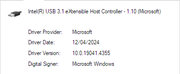
      Even thou windows had no issues with the USB drivers and reinstalled the same one when I uninstalled it, I installed latest motherboard chipset download (Dated November 2021) from Intel and it has not had any issues since.

      Unfortunately I did not save the version MS have installed before the update but I this it might have been dated in 2023


      Image
      User avatar
      WonderDog
      Posts: 8
      Joined: 09 Jan 2025, 19:47
      Australia

      Re: D6-320 corrupts HDD partitions after several hous of use

      Post by WonderDog »

      Another 24 hours with 2 drives installed and stress tested by Copying 10TB to the drives 3TB and 7TB each.

      I will test it again this weekend with all 4 drives installed.

      Reinstalling the Motherboard Chipset Driver may have solved the issue.
      User avatar
      TMroy
      TM Support
      Posts: 3060
      Joined: 10 Mar 2020, 14:04
      China

      Re: D6-320 corrupts HDD partitions after several hous of use

      Post by TMroy »

      Thank you for your update.
      To contact our team, please send email to following addresses, remember to replace (at) with @:
      Support team: support(at)terra-master.com (for technical support only)
      Service team: service(at)terra-master.com (for purchasing, return, replacement, RMA service)
      User avatar
      WonderDog
      Posts: 8
      Joined: 09 Jan 2025, 19:47
      Australia

      Re: D6-320 corrupts HDD partitions after several hous of use  [SOLVED]

      Post by WonderDog »

      Solved I believe.

      This week I have rebuilt the pools and restored from backup twice with no problem.

      Looks like the problem might have been USB driver as reinstalling the chipset drivers seem to have solved it.
      User avatar
      JMTBerserker
      Posts: 1
      Joined: 08 Mar 2025, 13:34
      United States of America

      Re: D6-320 corrupts HDD partitions after several hous of use

      Post by JMTBerserker »

      I'm having this exact same issue right now and have now lost 3 drives this week. Do you mind sharing your PC hardware and the specific steps you took? I'm on a Beelink Mini S12 Pro along with the D6-320. I'm having some difficulty finding drivers.
      Post Reply

      Return to “USB Series”