Performance issue after upgrade to TOS 6.0.577-00166
Posted: 09 Jan 2025, 18:06
 Performance issue after upgrade to TOS 6.0.577-00166
I have a NAS F4-423 with two WD mechanical disks (no SSD) of 4TB configured in TRAID.
After the update to TOS 6.0.577-00166 I notice a certain slowness in consulting photos with the "Photos" app. In particular I refer to facial recognition and recognition of places.
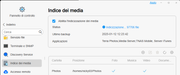
The hard disk has been working for almost 2 days but, in the Photos app it does not declare that it is performing a synchronization or anything else.
If I select "Places" or "People" the Photos app freezes.
I admit that I have several photos and videos in my archive with about 100,000 files in about 1,000 folders and therefore I wanted to know if these times are correct based on your experience.
May be useful to add a SSD as cache? Hown much TB?
May be useful to change some settings in Photos configuration panel? I set to able to recognize faces and places, as well.
The personal computer from which I connect to the NAS is a DELL i7 mobile with 64GB of RAM, 2.6GHz, 6 core-12 processors and the wifi is about 500Mb in download and upload.