Performance issue after upgrade to TOS 6.0.577-00166

CPU, memory, fan, process, services status, system log, tempreture
Locked
User avatar
nicky6501
Posts: 15
Joined: 29 Dec 2024, 19:29
Italy

Performance issue after upgrade to TOS 6.0.577-00166

Post by nicky6501 »

:( Performance issue after upgrade to TOS 6.0.577-00166

I have a NAS F4-423 with two WD mechanical disks (no SSD) of 4TB configured in TRAID.

After the update to TOS 6.0.577-00166 I notice a certain slowness in consulting photos with the "Photos" app. In particular I refer to facial recognition and recognition of places.

The hard disk has been working for almost 2 days but, in the Photos app it does not declare that it is performing a synchronization or anything else.

If I select "Places" or "People" the Photos app freezes.
I admit that I have several photos and videos in my archive with about 100,000 files in about 1,000 folders and therefore I wanted to know if these times are correct based on your experience.

May be useful to add a SSD as cache? Hown much TB?
May be useful to change some settings in Photos configuration panel? I set to able to recognize faces and places, as well.


The personal computer from which I connect to the NAS is a DELL i7 mobile with 64GB of RAM, 2.6GHz, 6 core-12 processors and the wifi is about 500Mb in download and upload.

User avatar
RyanYang
TM Support
Posts: 1141
Joined: 01 Dec 2020, 11:50
China

Re: Performance issue after upgrade to TOS 6.0.577-00166

Post by RyanYang »

Do you mean the app stops automatically? Or is there nothing going on and you need to refresh your browser?
In general, it can be used without SSD cache.
You can go to the process module of TOS control panel to see what process takes up a lot of CPU and memory.
After adding photos, the system will perform media indexing, thumbnail-generating, face AI classification, scene AI classification, place recognition, etc.
In addition, the first use of AI classification needs to be connected to the Internet, or it will not work properly.
To contact our team, please send email to following addresses, remember to replace (at) with @
Technical team: support(at)terra-master.com (for technical support)
Service team: service(at)terra-master.com (for purchasing, return, replacement)
User avatar
nicky6501
Posts: 15
Joined: 29 Dec 2024, 19:29
Italy

Re: Performance issue after upgrade to TOS 6.0.577-00166

Post by nicky6501 »

Image

- stopped the Media Server and the Photo index
- stopped NAS
- modified the owner and group of the folder containing photos, video and music files (because they were changed to superuser user during TOS6 upgrade, I don't know why...)
- restarted NAS.
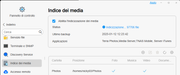
- Now I started newly the index of the media. See image.

May I verify the status of the indexing process? It seems blocked to 97706 file as in the image...
Locked

Return to “System Resources”