USB Copy Extremely Slow

The brand-new USB Copy not only provides common backup features, in order to realize offline backup and defend against threats from external networks.
Locked
User avatar
madmax1972
Posts: 13
Joined: 04 Jan 2025, 22:17
Russia

USB Copy Extremely Slow

Post by madmax1972 »

Good day!
I have TerraMaster F2-212 device with TOS version 5.1.73-00078.
Connected to device:
HDD1 - 6Tb ST6000VX001 with BTRFS volume
USB HDD - 1Tb Toshiba MQ04UBF100 in USB3.0 connector with NTFS partition - HDD lights blue lamp, which show about high-speed connection with device
USB UPS CPS Value600EI in USB 2.0 connector
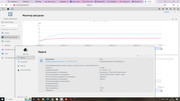
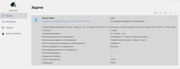
I need copy from HDD1 1Tb of data (71784 files) to USB HDD, but device says to me about 50 hours with USB Copy - why so slow? I can connect to TNAS my PC via 1Gb Ethernet and copy same 1Tb more quickly, but why F2-212 haven't same speed inside between HDD1 and USB HDD? What I can do to correct USB Copy speed to normal (min 50-60Mb/sec)?
Image
TMpzhen

Re: USB Copy Extremely Slow

Post by TMpzhen »

madmax1972 wrote: 04 Jan 2025, 22:39
This estimated time is not very accurate. The speed of USB is closely related to the disk and data cable. You can replace the disk and data cable to see if the speed has improved.
User avatar
madmax1972
Posts: 13
Joined: 04 Jan 2025, 22:17
Russia

Re: USB Copy Extremely Slow

Post by madmax1972 »

Today
Image

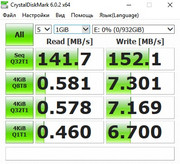
Testing of USB HDD (from Internet but my testing near that):
Image
User avatar
madmax1972
Posts: 13
Joined: 04 Jan 2025, 22:17
Russia

Re: USB Copy Extremely Slow

Post by madmax1972 »

Since 6 hours:
Image
User avatar
GevinKe
TM Product Manager
Posts: 251
Joined: 08 Dec 2023, 10:27
China

Re: USB Copy Extremely Slow

Post by GevinKe »

madmax1972 wrote: 05 Jan 2025, 19:01 Since 6 hours:
Image
Hello!

Let me explain why transferring files between your PC and TNAS over the network can sometimes be faster than using a USB connection to TNAS. This is because network transfers rely on file protocols, and their speed is influenced by the PC's disk read speed, TNAS's disk write speed, and the maximum bandwidth of the network.

On the other hand, the transfer speed via USB depends on the quality of the connection cable, the read speed of the USB interface, and the write speed of TNAS's disks. To test if the USB transfer speed is functioning normally, you can try connecting the USB device to the 3.0 interface of your PC and perform a file copy operation.

If you confirm that the PC's disk read/write speed and USB read/write speed are normal, and the USB interface is version 3.0, but the transfer speed remains slow, we recommend reaching out to our customer service team through our official website to schedule technical support. We will assist you in identifying and resolving the issue.
To contact our team, please send email to following addresses, remember to replace (at) with @:

Technical team: support(at)terra-master.com(for technical support)
Service team: service(at)terra-master.com(for purchasing, return, replacement, RMA service)
User avatar
madmax1972
Posts: 13
Joined: 04 Jan 2025, 22:17
Russia

Re: USB Copy Extremely Slow

Post by madmax1972 »

I changed USB HDD 1Tb to another one with exFAT, and USB Copy copied 1Tb near 5 hours. After this I formatted first USB HDD drive to exFAT, and USB Copy copied 1Tb near 7 hours to this drive. I think that weak CPU of F2-212 and NTFS-3G cannot gave normal speed if drive NTFS formatted.
User avatar
TMLila
TM Product Manager
Posts: 90
Joined: 30 Apr 2024, 16:27
China

Re: USB Copy Extremely Slow

Post by TMLila »

madmax1972 wrote: 10 Jan 2025, 11:34 I changed USB HDD 1Tb to another one with exFAT, and USB Copy copied 1Tb near 5 hours. After this I formatted first USB HDD drive to exFAT, and USB Copy copied 1Tb near 7 hours to this drive. I think that weak CPU of F2-212 and NTFS-3G cannot gave normal speed if drive NTFS formatted.
Thank you for your feedback. We will relay this to our product team for verification.
User avatar
GevinKe
TM Product Manager
Posts: 251
Joined: 08 Dec 2023, 10:27
China

Re: USB Copy Extremely Slow

Post by GevinKe »

madmax1972 wrote: 10 Jan 2025, 11:34 I changed USB HDD 1Tb to another one with exFAT, and USB Copy copied 1Tb near 5 hours. After this I formatted first USB HDD drive to exFAT, and USB Copy copied 1Tb near 7 hours to this drive. I think that weak CPU of F2-212 and NTFS-3G cannot gave normal speed if drive NTFS formatted.
Hello, regarding the issue you reported, we have forwarded it to our product team for repair. Please be patient and wait for the release of the new version. Thank you for your understanding and support.
To contact our team, please send email to following addresses, remember to replace (at) with @:

Technical team: support(at)terra-master.com(for technical support)
Service team: service(at)terra-master.com(for purchasing, return, replacement, RMA service)
User avatar
madmax1972
Posts: 13
Joined: 04 Jan 2025, 22:17
Russia

Re: USB Copy Extremely Slow

Post by madmax1972 »

Thank for you feedback.
Locked

Return to “USB Copy”