Page 1 of 3
TNAS File Transfer Failing
Posted: 29 Dec 2024, 19:12
by francmua
I'm trying to transfer files to the NAS from my mac, however I keep coming across this issue where some files either don't copy across or they do but stay greyed out. What's the issue here?
Video showing issue:
https://youtu.be/fM9Csas_dcA
Re: TNAS File Transfer Failing
Posted: 17 Jan 2025, 20:01
by fabiomo83
I'm also on Mac and I have exactly the same issue with my Terramaster F8 SSD Plus.
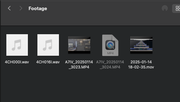
When I transfer files from my Mac to the NAS: some of them get transferred ok, some of them get transferred but turn grey (still usable for DaVinci Resolve, my editing software but I can't open them with QuickTime) and some of them get transferred then turn grey and then they disappear.
The problem is that this behaviour is completely random. Sometimes transferring the same file again fixes the issue but others don't.
I also have another NAS from Synology, connected via SMB to the same Mac and through the same switch, and I NEVER HAD A SINGLE PROBLEM WITH THAT.
The only one that's giving me issues is the Terramaster one.
I already tried several settings under SMB on the NAS but none of them fixed my issue.
The only thing I can say, is that for me it started happening a couple of TOS updates ago. Before that, I didn't have the same issue.
Anyone can help?
Re: TNAS File Transfer Failing
Posted: 18 Jan 2025, 15:10
by TMroy
So far, we still don't know the cause of this problem. Here are some suggestions I got from ChatGPT, you can give them a try.
The issue where files appear grayed out in Finder and cannot be opened after transferring them from your MacBook to your NAS (via SMB file service) could be due to several reasons. Here are some possibilities:
1. **File Permissions Issue**
- **Problem:** The files may not have the correct permissions on the NAS after transfer, especially if the SMB share on the NAS is not properly set up to allow the Mac user to read/write the files.
- **Solution:** Check the file permissions on the NAS. Ensure that the user or group associated with your MacBook has the necessary read and write permissions for those files. You may need to adjust the permissions through the NAS's management interface.
2. **Corrupted Transfer**
- **Problem:** The file transfer might have been interrupted or corrupted, leading to files that are unreadable on the NAS side.
- **Solution:** Try re-transferring the files and ensure the transfer completes without issues. You can also check the file sizes before and after the transfer to see if they match.
3. **SMB Caching/Indexing Issues**
- **Problem:** There might be an issue with how macOS caches or indexes files from network shares. Sometimes, Finder shows files in a grayed-out state when it hasn't fully indexed or synced the file system on the NAS.
- **Solution:** Try unmounting and remounting the SMB share on your MacBook. You can also try restarting Finder or the Mac itself. If the NAS supports it, you might also try disabling any SMB caching features.
4. **File Locking or Conflicts**
- **Problem:** If another process or user is accessing the files on the NAS at the same time, the files may be locked or in a conflicting state.
- **Solution:** Check if any other devices or users are accessing the files and ensure no file locks are preventing access.
5. **File Type or Metadata Issues**
- **Problem:** Some files may have metadata that macOS is unable to handle correctly after being transferred, especially if the files are in a format that's unusual or if there's a metadata mismatch between the NAS and macOS.
- **Solution:** Check the file types and see if any specific files are consistently having issues. You might try re-saving or re-exporting those files from your Mac before transferring again.
6. **Finder Bug**
- **Problem:** Occasionally, Finder can have bugs or glitches that cause files to appear incorrectly (like being grayed out).
- **Solution:** Try restarting Finder (`Cmd + Option + Esc`, then select Finder and click "Relaunch") or restarting your MacBook.
Steps to diagnose:
- **Test permissions:** Right-click a grayed-out file in Finder, choose "Get Info" and check the permissions section.
- **Transfer a single file:** Try transferring one file to see if the issue persists with just one file.
- **Try accessing the files via other means:** Use a different file manager or terminal (`smb://<your-nas-ip>`) to check if you can access the files outside Finder.
Re: TNAS File Transfer Failing
Posted: 18 Jan 2025, 15:13
by RyanYang
We have reported this issue to our engineers and we are still looking for a solution to this issue.
If easy to randomly appear this kind of situation, maybe you can try using another method, such as WebDAV:
viewtopic.php?t=6441
Re: TNAS File Transfer Failing
Posted: 18 Jan 2025, 19:37
by fabiomo83
I already tried all possible tricks, but nothing works.
As a Computer Engineer, the fact that transferring the same files, from the same source, from the same machine works flawlessly to the Synology NAS and has issues with the Terramaster F8 SSD Plus, makes me believe that it's a TOS problem.
If it helps debugging the situation, using the xattr command line tool on the files that are showing grey shows that they have a special attribute set called com.apple.FinderInfo: brokMACS
Trying to remove this special attribute with xattr -c doesn't work. Even if launch xattr as sudo.
Re: TNAS File Transfer Failing
Posted: 25 Jan 2025, 15:57
by watson01
fabiomo83 wrote: ↑17 Jan 2025, 20:01
I'm also on Mac and I have exactly the same issue with my Terramaster F8 SSD Plus.
When I transfer files from my Mac to the NAS: some of them get transferred ok, some of them get transferred but turn grey (still usable for DaVinci Resolve, my editing software but I can't open them with QuickTime) and some of them get transferred then turn grey and then they disappear.
The problem is that this behaviour is completely random. Sometimes transferring the same file again fixes the issue but others don't.
https://alightmotionlab.com
I also have another NAS from Synology, connected via SMB to the same Mac and through the same switch, and I NEVER HAD A SINGLE PROBLEM WITH THAT.
The only one that's giving me issues is the Terramaster one.
I already tried several settings under SMB on the NAS but none of them fixed my issue.
The only thing I can say, is that for me it started happening a couple of TOS updates ago. Before that, I didn't have the same issue.
Anyone can help?
It sounds like a file system compatibility or network issue. Try updating your Terramaster F8 SSD Plus firmware and ensure your Mac’s macOS is up to date. Also, check for any known issues with the specific DaVinci Resolve version you’re using.
Re: TNAS File Transfer Failing
Posted: 25 Jan 2025, 16:10
by fabiomo83
Everything is up to date and it doesn't depend on DaVinci.
The files become grey as soon as I copy and paste them from the SD card using only Finder.
The same issue doesn't occur with the other Synology NAS I have, connected to the same switch.
As I wrote in the other post, as a Computer Engineer, the fact that transferring the same files, from the same source, from the same machine works flawlessly to the Synology NAS and has issues with the Terramaster F8 SSD Plus, makes me believe that it's a Terramaster/TOS problem.
Re: TNAS File Transfer Failing
Posted: 25 Jan 2025, 17:42
by TMroy
This issue may be attributed to the configuration of SMB. We are currently in the process of verifying this problem. Please stay tuned for our updates.
Re: TNAS File Transfer Failing
Posted: 26 Apr 2025, 09:22
by rudedog
Any update on this issue? I'm having the same issue but now files transfer to the NAS completes stays grey then in some cases disappears. the ones that stay greyed out I can not access but I can access from a windows or Linux box. No problems with my old Sinology NAS that i replaced with the below Terramaster NAS
My desktop Imac pro running Sonoma connected via 2.5G switch to the nas
Nas is F4-424 Pro running 5.1.145-00320 uptime is 86 days (when purchased. Have (4) 12TB drives.
tried all the above as well as seeing if there is an update via the TOS web panel and says I have the latest.
thanks in advance.
Re: TNAS File Transfer Failing
Posted: 26 Apr 2025, 14:10
by TMnick
In the new version of TOS 6, this issue has already been resolved. However, for your current version 5.1, the problem still exists. You can try deleting the gray file and then re-uploading it, and it should work normally.